Category: Blog

  • anomalytics

    Anomalytics

    Your Ultimate Anomaly Detection & Analytics Tool

    pre-commit.ci status Code style: black Imports: isort mypy checked CI - Build CI - Code Quality CI - Automated Testing License: MIT Documentation PyPi

    Introduction

    anomalytics is a Python library that aims to implement all statistical methods for the purpose of detecting any sort of anomaly e.g. extreme events, high or low anomalies, etc. This library utilises external dependencies such as:

    anomalytics supports the following Python’s versions: 3.10.x, 3.11.x, 3.12.0.

    Installation

    To use the library, you can install as follow:

    # Install without openpyxl
    $ pip3 install anomalytics
    
    # Install with openpyxl
    $ pip3 install "anomalytics[extra]"

    As a contributor/collaborator, you may want to consider installing all external dependencies for development purposes:

    # Install bandit, black, isort, mypy, openpyxl, pre-commit, and pytest-cov
    $ pip3 install "anomalytics[codequality,docs,security,testcov,extra]"

    Use Case

    anomalytics can be used to analyze anomalies in your dataset (both as pandas.DataFrame or pandas.Series). To start, let’s follow along with this minimum example where we want to detect extremely high anomalies in our dataset.

    Read the walkthrough below, or the concrete examples here:

    Anomaly Detection via the Detector Instance

    1. Import anomalytics and initialise our time series of 100_002 rows:

      import anomalytics as atics
      
      df = atics.read_ts("./ad_impressions.csv", "csv")
      df.head()
                     datetime	    xandr	      gam	    adobe
      0	2023-10-18 09:01:00	52.483571	71.021131	35.681915
      1	2023-10-18 09:02:00	49.308678	73.651996	60.347246
      2	2023-10-18 09:03:00	53.238443	65.690813	48.120805
      3	2023-10-18 09:04:00	57.615149	80.944393	59.550775
      4	2023-10-18 09:05:00	48.829233	76.445099	26.710413
    2. Initialize the needed detector object. Each detector utilises a different statistical method for detecting anomalies. In this example, we’ll use POT method and a high anomaly type. Pay attention to the time period that is directly created where the t2 is 1 by default because “real-time” always targets the “now” period hence 1 (sec, min, hour, day, week, month, etc.):

      pot_detector = atics.get_detector(method="POT", dataset=ts, anomaly_type="high")
      
      print(f"T0: {pot_detector.t0}")
      print(f"T1: {pot_detector.t1}")
      print(f"T2: {pot_detector.t2}")
      
      pot_detector.plot(ptype="line-dataset-df", title=f"Page Impressions Dataset", xlabel="Minute", ylabel="Impressions", alpha=1.0)
      T0: 42705
      T1: 16425
      T2: 6570

      Ad Impressions Dataset

    3. The purpose of using the detector object instead the standalone is to have a simple fix detection flow. In case you want to customize the time window, we can call the reset_time_window() to reset t2 value, even though that will beat the purpose of using a detector object. Pay attention to the period parameters because the method expects a percentage representation of the distribution of period (ranging 0.0 to 1.0):

      pot_detector.reset_time_window(
          "historical",
          t0_pct=0.65,
          t1_pct=0.25,
          t2_pct=0.1
      )
      
      print(f"T0: {pot_detector.t0}")
      print(f"T1: {pot_detector.t1}")
      print(f"T2: {pot_detector.t2}")
      
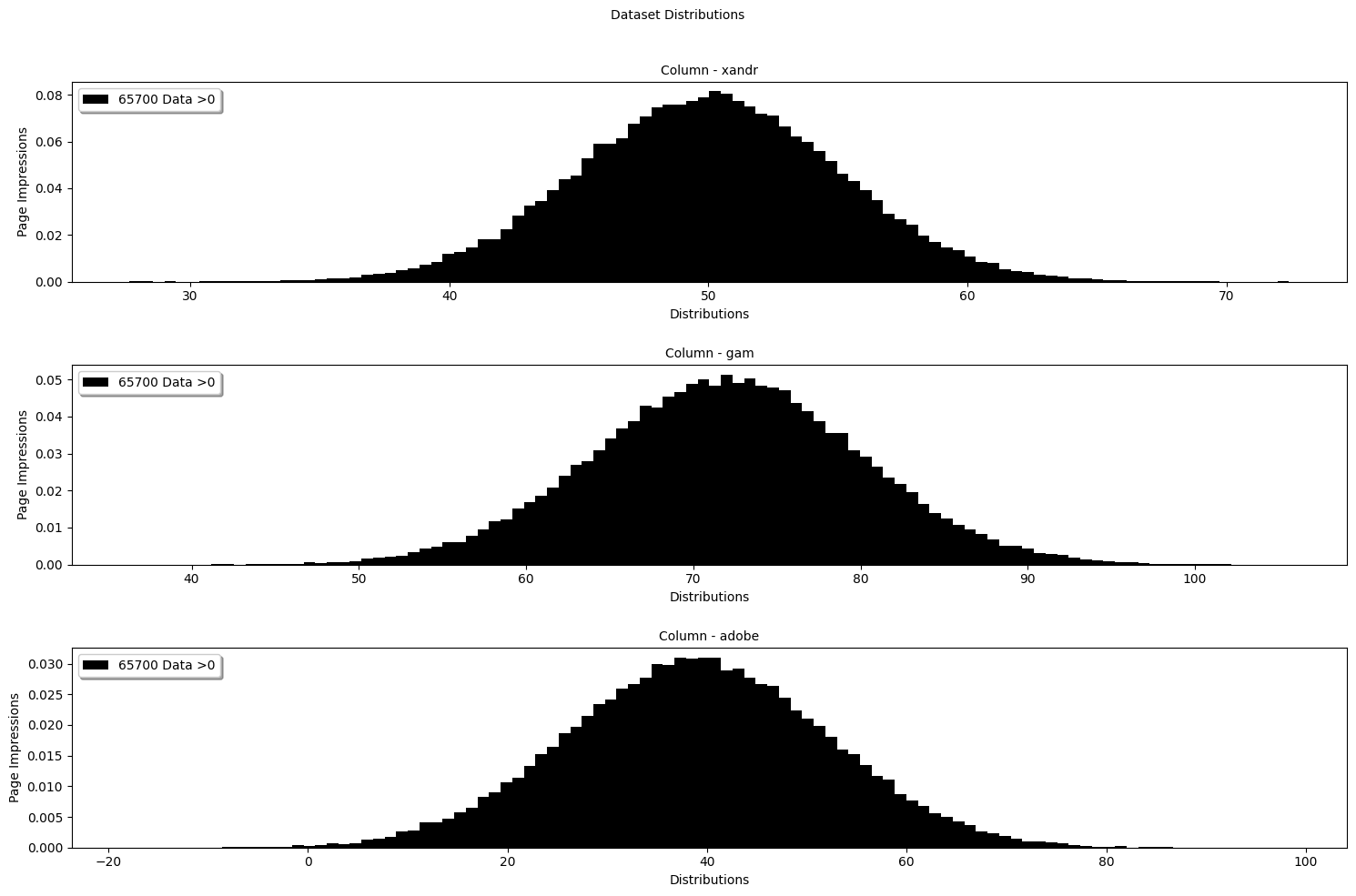
      pot_detector.plot(ptype="hist-dataset-df", title="Dataset Distributions", xlabel="Distributions", ylabel="Page Impressions", alpha=1.0, bins=100)
      T0: 65001
      T1: 25001
      T2: 10000
      Ad Impressions Hist

    4. Now, we can extract exceedances by giving the expected quantile:

      pot_detector.get_extremes(0.95)
      pot_detector.exeedance_thresholds.head()
              xandr	      gam	    adobe	           datetime
      0	58.224653	85.177029	60.362306	2023-10-18 09:01:00
      1	58.224653	85.177029	60.362306	2023-10-18 09:02:00
      2	58.224653	85.177029	60.362306	2023-10-18 09:03:00
      3	58.224653	85.177029	60.362306	2023-10-18 09:04:00
      4	58.224653	85.177029	60.362306	2023-10-18 09:05:00
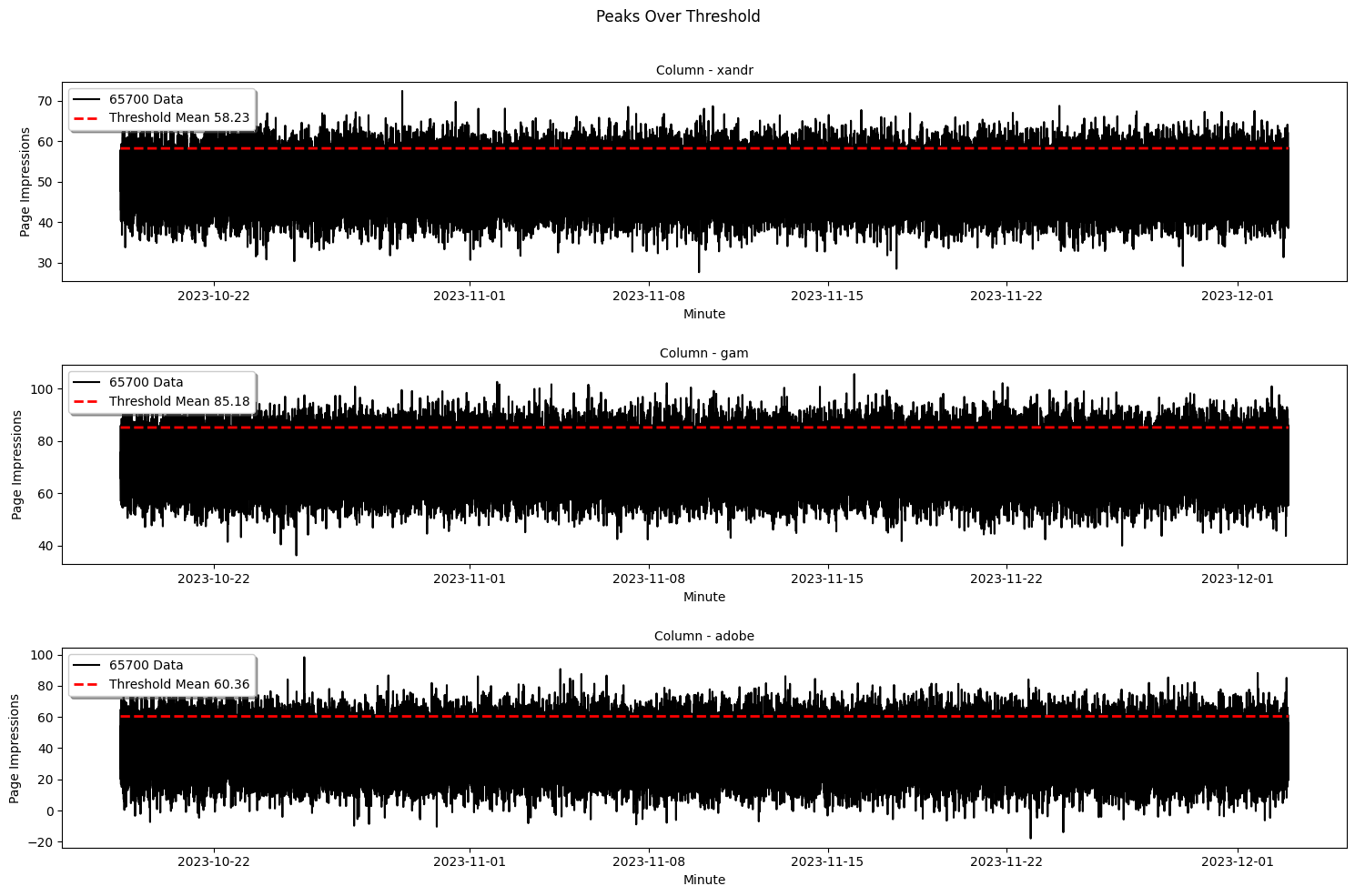
    5. Let’s visualize the exceedances and its threshold to have a clearer understanding of our dataset:

      pot_detector.plot(ptype="line-exceedance-df", title="Peaks Over Threshold", xlabel="Minute", ylabel="Page Impressions", alpha=1.0)
      Exceedance-POT

    6. Now that we have the exceedances, we can fit our data into the chosen distribution, in this example the “Generalized Pareto Distribution”. The first couple rows will be zeroes which is normal because we only fit data that are greater than zero into the wanted distribution:

      pot_detector.fit()
      pot_detector.fit_result.head()
          xandr_anomaly_score gam_anomaly_score   adobe_anomaly_score	total_anomaly_score	           datetime
      0	           1.087147	         0.000000              0.000000	           1.087147	2023-11-17 00:46:00
      1	           0.000000	         0.000000              0.000000	           0.000000	2023-11-17 00:47:00
      2	           0.000000	         0.000000              0.000000	           0.000000	2023-11-17 00:48:00
      3	           0.000000	         1.815875              0.000000	           1.815875	2023-11-17 00:49:00
      4	           0.000000	         0.000000              0.000000	           0.000000	2023-11-17 00:50:00
      ...
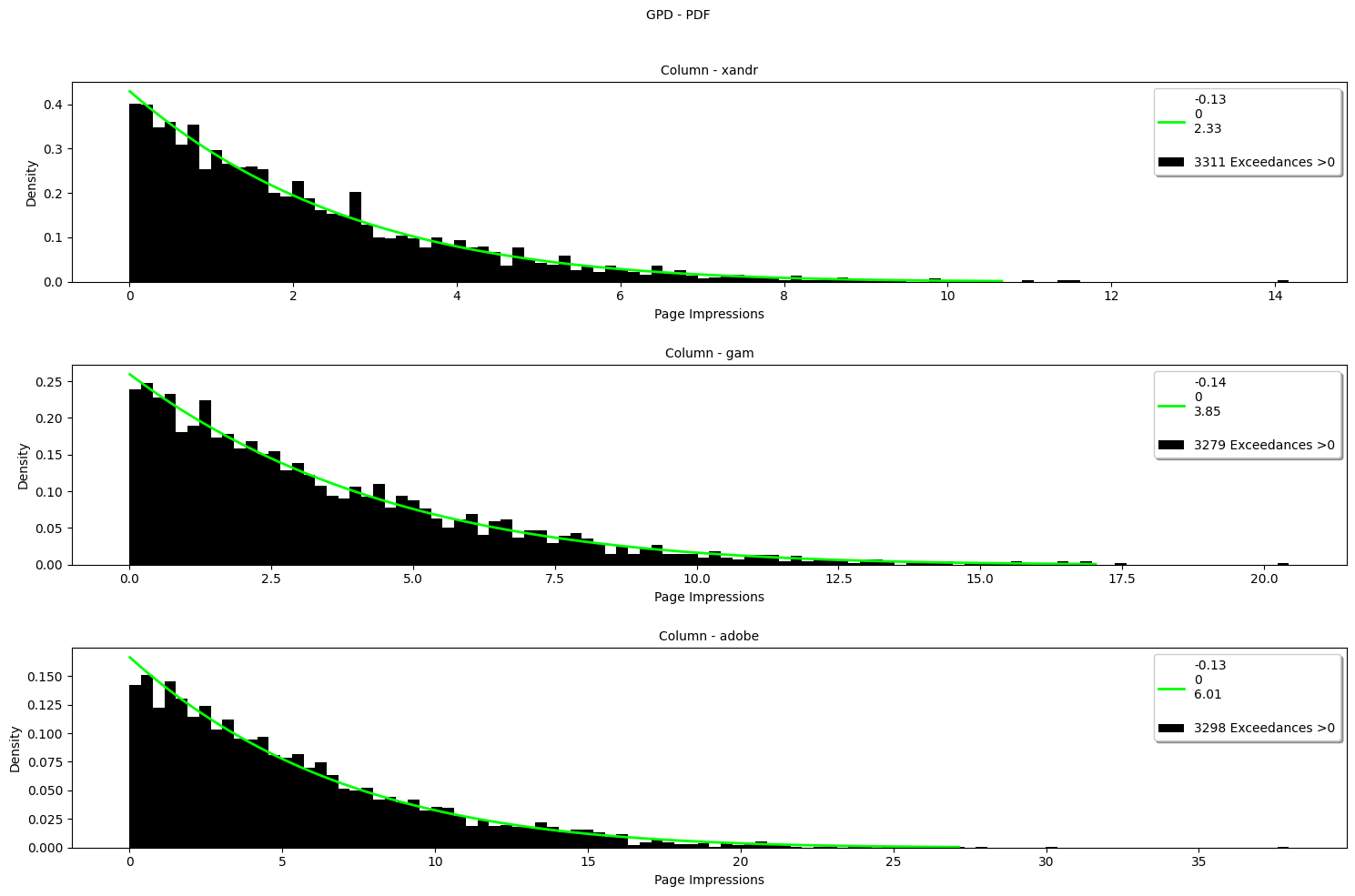
    7. Let’s inspect the GPD distributions to get the intuition of our pareto distribution:

      pot_detector.plot(ptype="hist-gpd-df", title="GPD - PDF", xlabel="Page Impressions", ylabel="Density", alpha=1.0, bins=100)
      GPD-PDF

    8. The parameters are stored inside the detector class:

      pot_detector.params
      {0: {'xandr': {'c': -0.11675297447288158,
      'loc': 0,
      'scale': 2.3129766056305603,
      'p_value': 0.9198385927065513,
      'anomaly_score': 1.0871472537998},
      'gam': {'c': 0.0,
      'loc': 0.0,
      'scale': 0.0,
      'p_value': 0.0,
      'anomaly_score': 0.0},
      'adobe': {'c': 0.0,
      'loc': 0.0,
      'scale': 0.0,
      'p_value': 0.0,
      'anomaly_score': 0.0},
      'total_anomaly_score': 1.0871472537998},
      1: {'xandr': {'c': 0.0,
      'loc': 0.0,
      'scale': 0.0,
      'p_value': 0.0,
      'anomaly_score': 0.0},
      'gam': {'c': 0.0,
      'loc': 0.0,
      'scale': 0.0,
      'p_value': 0.0,
      ...
      'scale': 0.0,
      'p_value': 0.0,
      'anomaly_score': 0.0},
      'total_anomaly_score': 0.0},
      ...}
    9. Last but not least, we can now detect the extremely large (high) anomalies:

      pot_detector.detect(0.95)
      pot_detector.detection_result
      16425    False
      16426    False
      16427    False
      16428    False
      16429    False
              ...
      22990    False
      22991    False
      22992    False
      22993    False
      22994    False
      Name: detected data, Length: 6570, dtype: bool
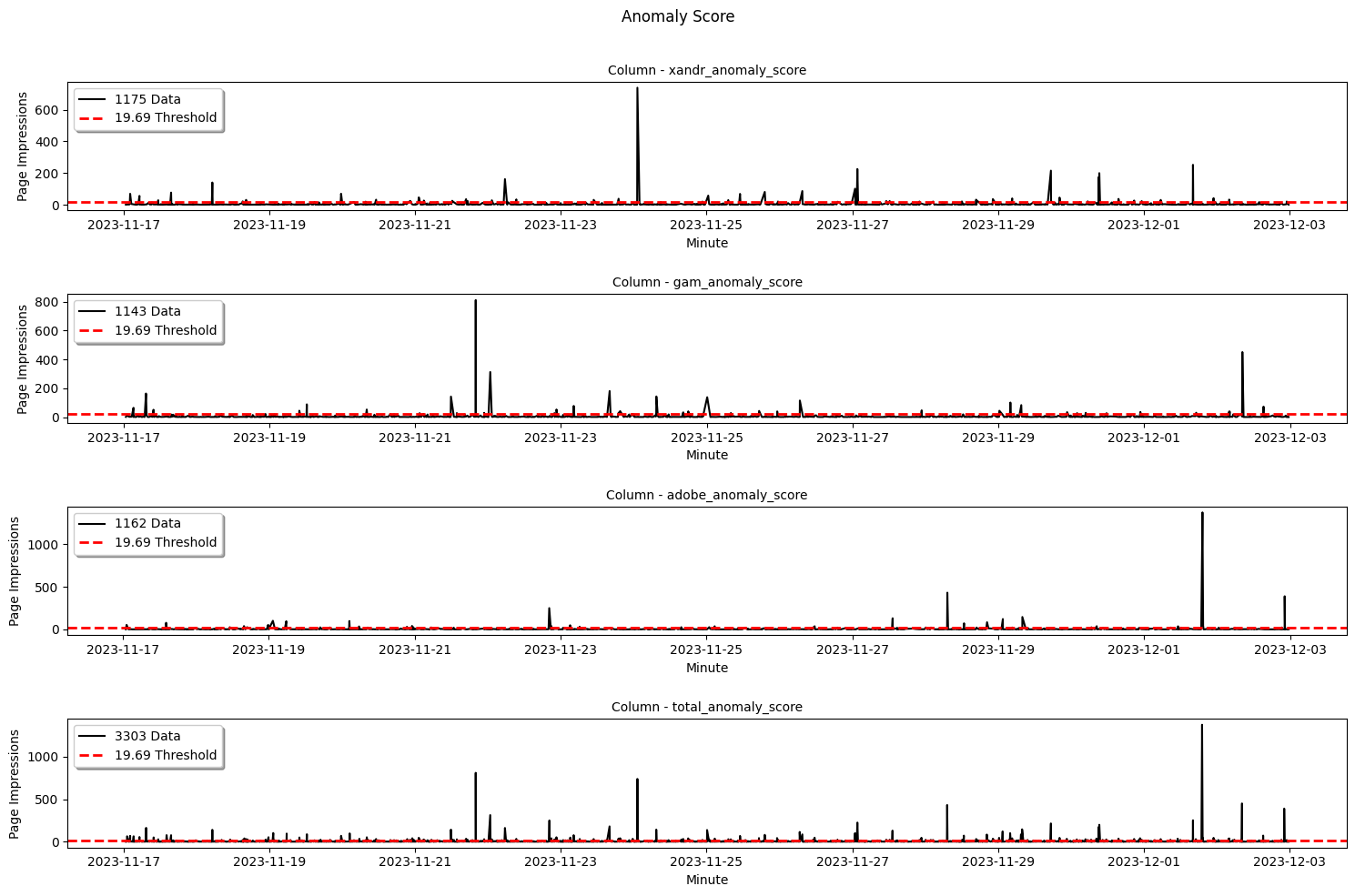
    10. Now we can visualize the anomaly scores from the fitting with the anomaly threshold to get the sense of the extremely large values:

      pot_detector.plot(ptype="line-anomaly-score-df", title="Anomaly Score", xlabel="Minute", ylabel="Page Impressions", alpha=1.0)
      Anomaly Scores

    11. Now what? Well, while the detection process seems quite straight forward, in most cases getting the details of each anomalous data is quite tidious! That’s why anomalytics provides a comfortable method to get the summary of the detection so we can see when, in which row, and how the actual anomalous data look like:

      pot_detector.detection_summary.head(5)
                                row	    xandr	      gam	    adobe	xandr_anomaly_score	gam_anomaly_score	adobe_anomaly_score	total_anomaly_score	anomaly_threshold
      2023-11-28 12:06:00	    59225	64.117135	76.425925	47.772929	          21.445759	        0.000000	          0.000000	          21.445759	        19.689885
      2023-11-28 12:25:00	    59244	40.513415	94.526021	65.921644	          0.000000	        19.557962	          2.685337	          22.243299	        19.689885
      2023-11-28 12:45:00	    59264	52.362039	54.191719	79.972860	          0.000000	        0.000000	          72.313273	          72.313273	        19.689885
      2023-11-28 16:48:00	    59507	64.753203	70.344142	42.540168	          32.543021	        0.000000	          0.000000	          32.543021	        19.689885
      2023-11-28 16:53:00	    59512	35.912221	52.572939	75.621003	          0.000000	        0.000000	          22.199505	          22.199505	        19.689885
    12. In every good analysis there is a test! We can evaluate our analysis result with “Kolmogorov Smirnov” 1 sample test to see how far the statistical distance between the observed sample distributions to the theoretical distributions via the fitting parameters (the smaller the stats_distance the better!):

      pot_detector.evaluate(method="ks")
      pot_detector.evaluation_result
          column	total_nonzero_exceedances	stats_distance	p_value	        c	loc	    scale
      0	 xandr	                     3311	      0.012901	0.635246 -0.128561	  0	 2.329005
      1	 gam	                     3279	      0.011006	0.817674 -0.140479	  0	 3.852574
      2	 adobe	                     3298	      0.019479	0.161510 -0.133019	  0	 6.007833
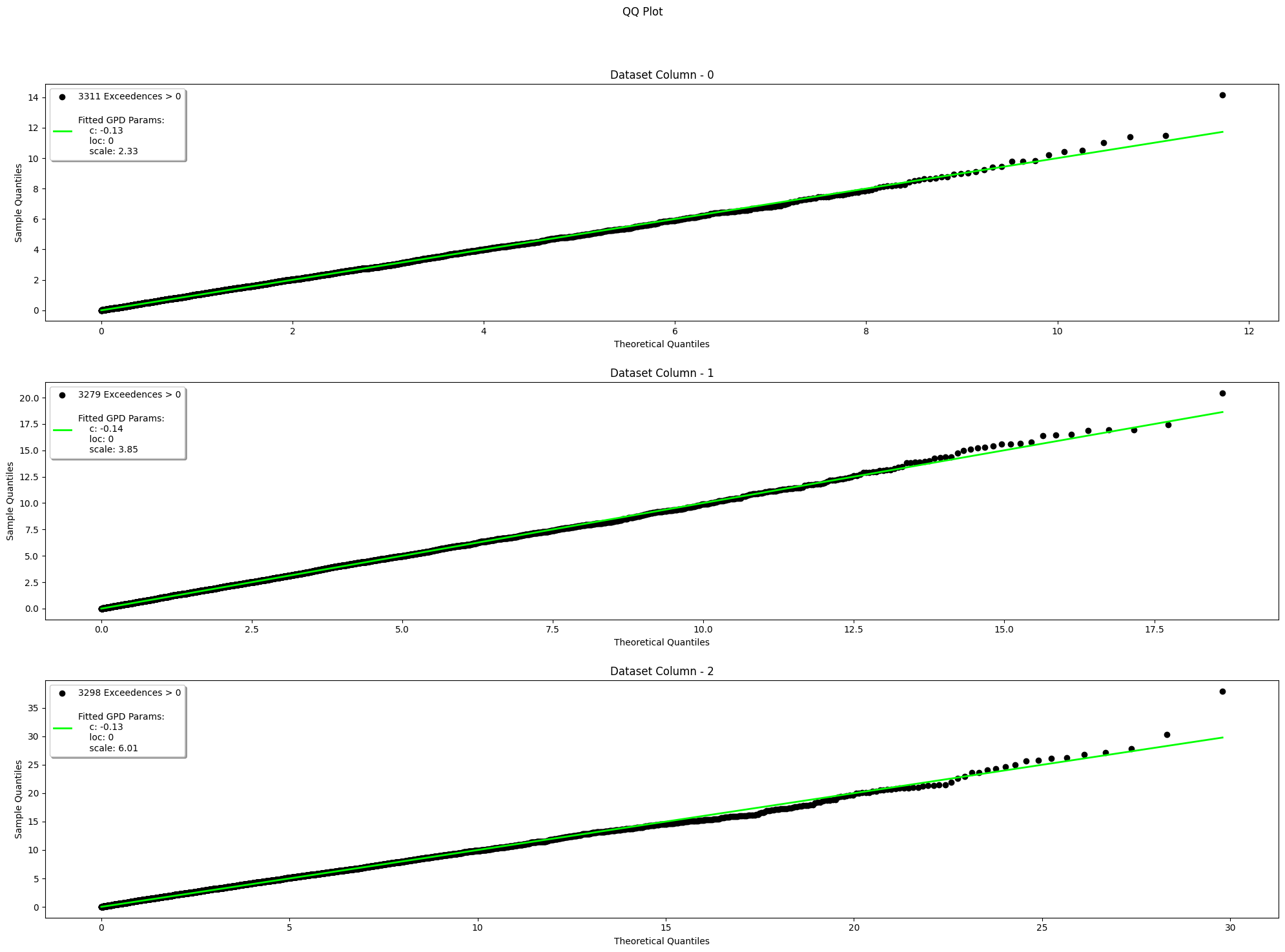
    13. If 1 test is not enough for evaluation, we can also visually test our analysis result with “Quantile-Quantile Plot” method to observed the sample quantile vs. the theoretical quantile:

      # Use the last non-zero parameters
      pot_detector.evaluate(method="qq")
      
      # Use a random non-zero parameters
      pot_detector.evaluate(method="qq", is_random=True)
      QQ-Plot GPD

    Anomaly Detection via Standalone Functions

    You have a project that only needs to be fitted? To be detected? Don’t worry! anomalytics also provides standalone functions as well in case users want to start the anomaly analysis from a different starting points. It is more flexible, but many processing needs to be done by you. LEt’s take an example with a different dataset, thistime the water level Time Series!

    1. Import anomalytics and initialise your time series:

      import anomalytics as atics
      
      ts = atics.read_ts(
          "water_level.csv",
          "csv"
      )
      ts.head()
      2008-11-03 06:00:00    0.219
      2008-11-03 07:00:00   -0.041
      2008-11-03 08:00:00   -0.282
      2008-11-03 09:00:00   -0.368
      2008-11-03 10:00:00   -0.400
      Name: Water Level, dtype: float64
    2. Set the time windows of t0, t1, and t2 to compute dynamic expanding period for calculating the threshold via quantile:

      t0, t1, t2 = atics.set_time_window(
          total_rows=ts.shape[0],
          method="POT",
          analysis_type="historical",
          t0_pct=0.65,
          t1_pct=0.25,
          t2_pct=0.1
      )
      
      print(f"T0: {t0}")
      print(f"T1: {t1}")
      print(f"T2: {t2}")
      T0: 65001
      T1: 25001
      T2: 10000
    3. Extract exceedances and indicate that it is a "high" anomaly type and what’s the quantile:

      pot_thresholds = get_threshold_peaks_over_threshold(dataset=ts, t0=t0, "high", q=0.90)
      pot_exceedances = atics.get_exceedance_peaks_over_threshold(
          dataset=ts,
          threshold_dataset=pot_thresholds,
          anomaly_type="high"
      )
      
      exceedances.head()
      2008-11-03 06:00:00    0.859
      2008-11-03 07:00:00    0.859
      2008-11-03 08:00:00    0.859
      2008-11-03 09:00:00    0.859
      2008-11-03 10:00:00    0.859
      Name: Water Level, dtype: float64
    4. Compute the anomaly scores for each exceedance and initialize a params for further analysis and evaluation:

      params = {}
      anomaly_scores = atics.get_anomaly_score(
          exceedance_dataset=pot_exceedances,
          t0=t0,
          gpd_params=params
      )
      
      anomaly_scores.head()
      2016-04-03 15:00:00    0.0
      2016-04-03 16:00:00    0.0
      2016-04-03 17:00:00    0.0
      2016-04-03 18:00:00    0.0
      2016-04-03 19:00:00    0.0
      Name: anomaly scores, dtype: float64
      ...
    5. Inspect the parameters:

      params
      {0: {'index': Timestamp('2016-04-03 15:00:00'),
      'c': 0.0,
      'loc': 0.0,
      'scale': 0.0,
      'p_value': 0.0,
      'anomaly_score': 0.0},
      1: {'index': Timestamp('2016-04-03 16:00:00'),
      ...
      'c': 0.0,
      'loc': 0.0,
      'scale': 0.0,
      'p_value': 0.0,
      'anomaly_score': 0.0},
      ...}
    6. Detect anomalies:

      anomaly_threshold = get_anomaly_threshold(
          anomaly_score_dataset=anomaly_scores,
          t1=t1,
          q=0.90
      )
      detection_result = get_anomaly(
          anomaly_score_dataset=anomaly_scores,
          threshold=anomaly_threshold,
          t1=t1
      )
      
      detection_result.head()
      2020-03-31 19:00:00    False
      2020-03-31 20:00:00    False
      2020-03-31 21:00:00    False
      2020-03-31 22:00:00    False
      2020-03-31 23:00:00    False
      Name: anomalies, dtype: bool
    7. For the test, kolmogorov-smirnov and qq plot are also accessible via standalone functions, but the params need to be processed so it only contains a non-zero parameters since there are no reasons to calculate a zero 😂

      nonzero_params = []
      
      for row in range(0, t1 + t2):
          if (
              params[row]["c"] != 0
              or params[row]["loc"] != 0
              or params[row]["scale"] != 0
          ):
              nonzero_params.append(params[row])
      
      ks_result = atics.evals.ks_1sample(
          dataset=pot_exceedances,
          stats_method="POT",
          fit_params=nonzero_params
      )
      
      ks_result
      {'total_nonzero_exceedances': [5028], 'stats_distance': [0.0284] 'p_value': [0.8987], 'c': [0.003566], 'loc': [0], 'scale': [0.140657]}
    8. Visualize via qq plot:

      nonzero_exceedances = exceedances[exceedances.values > 0]
      
      visualize_qq_plot(
          dataset=nonzero_exceedances,
          stats_method="POT",
          fit_params=nonzero_params,
      )

    Sending Anomaly Notification

    We have anomaly you said? Don’t worry, anomalytics has the implementation to send an alert via E-Mail or Slack. Just ensure that you have your email password or Slack webhook ready. This example shows both application (please read the comments 😎):

    1. Initialize the wanted platform:

      # Gmail
      gmail = atics.get_notification(
          platform="email",
          sender_address="my-cool-email@gmail.com",
          password="AIUEA13",
          recipient_addresses=["my-recipient-1@gmail.com", "my-recipient-2@web.de"],
          smtp_host="smtp.gmail.com",
          smtp_port=876,
      )
      
      # Slack
      slack = atics.get_notification(
          platform="slack",
          webhook_url="https://slack.com/my-slack/YOUR/SLACK/WEBHOOK",
      )
      
      print(gmail)
      print(slack)
      'Email Notification'
      'Slack Notification'
    2. Prepare the data for the notification! If you use standalone, you need to process the detection_result to become a DataFrame with row, “

      # Standalone
      detected_anomalies = detection_result[detection_result.values == True]
      anomalous_data = ts[detected_anomalies.index]
      standalone_detection_summary = pd.DataFrame(
          index=anomalous.index.flatten(),
          data=dict(
              row=[ts.index.get_loc(index) + 1 for index in anomalous.index],
              anomalous_data=[data for data in anomalous.values],
              anomaly_score=[score for score in anomaly_score[anomalous.index].values],
              anomaly_threshold=[anomaly_threshold] * anomalous.shape[0],
          )
      )
      
      # Detector Instance
      detector_detection_summary = pot_detector.detection_summary
    3. Prepare the notification payload and a custome message if needed:

      # Email
      gmail.setup(
          detection_summary=detection_summary,
          message="Extremely large anomaly detected! From Ad Impressions Dataset!"
      )
      
      # Slack
      slack.setup(
          detection_summary=detection_summary,
          message="Extremely large anomaly detected! From Ad Impressions Dataset!"
      )
    4. Send your notification! Beware that the scheduling is not implemented since it always depends on the logic of the use case:

      # Email
      gmail.send
      
      # Slack
      slack.send
      'Notification sent successfully.'
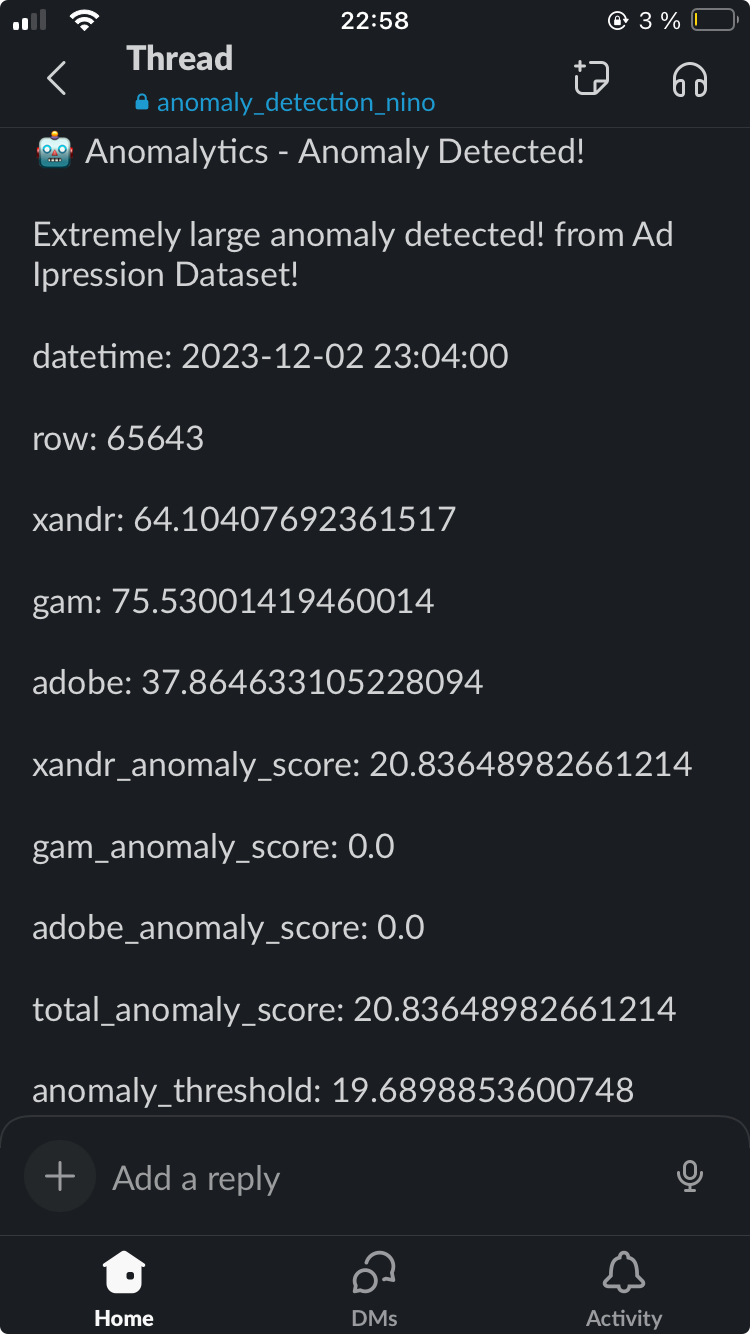
    5. Check your email or slack, this example produces the following notification via Slack:
      Anomaly SLack Notification

    Reference

    • Nakamura, C. (2021, July 13). On Choice of Hyper-parameter in Extreme Value Theory Based on Machine Learning Techniques. arXiv:2107.06074 [cs.LG]. https://doi.org/10.48550/arXiv.2107.06074

    • Davis, N., Raina, G., & Jagannathan, K. (2019). LSTM-Based Anomaly Detection: Detection Rules from Extreme Value Theory. In Proceedings of the EPIA Conference on Artificial Intelligence 2019. https://doi.org/10.48550/arXiv.1909.06041

    • Arian, H., Poorvasei, H., Sharifi, A., & Zamani, S. (2020, November 13). The Uncertain Shape of Grey Swans: Extreme Value Theory with Uncertain Threshold. arXiv:2011.06693v1 [econ.GN]. https://doi.org/10.48550/arXiv.2011.06693

    • Yiannis Kalliantzis. (n.d.). Detect Outliers: Expert Outlier Detection and Insights. Retrieved [23-12-04T15:10:12.000Z], from https://detectoutliers.com/

    Wall of Fame

    I am deeply grateful to have met and guided by wonderful people who inspired me to finish my capstone project for my study at CODE university of applied sciences in Berlin (2023). Thank you so much for being you!

    • Sabrina Lindenberg
    • Adam Roe
    • Alessandro Dolci
    • Christian Leschinski
    • Johanna Kokocinski
    • Peter Krauß
    Visit original content creator repository
  • Chainlink-CCIP-Foundry

    Chainlink CCIP Starter Kit

    Note

    This repository represents an example of using a Chainlink product or service. It is provided to help you understand how to interact with Chainlink’s systems so that you can integrate them into your own. This template is provided “AS IS” without warranties of any kind, has not been audited, and may be missing key checks or error handling to make the usage of the product more clear. Take everything in this repository as an example and not something to be copy pasted into a production ready service.

    This project demonstrates a couple of basic Chainlink CCIP use cases.

    Prerequisites

    Getting Started

    1. Install packages
    forge install
    

    and

    npm install
    
    1. Compile contracts
    forge build
    

    What is Chainlink CCIP?

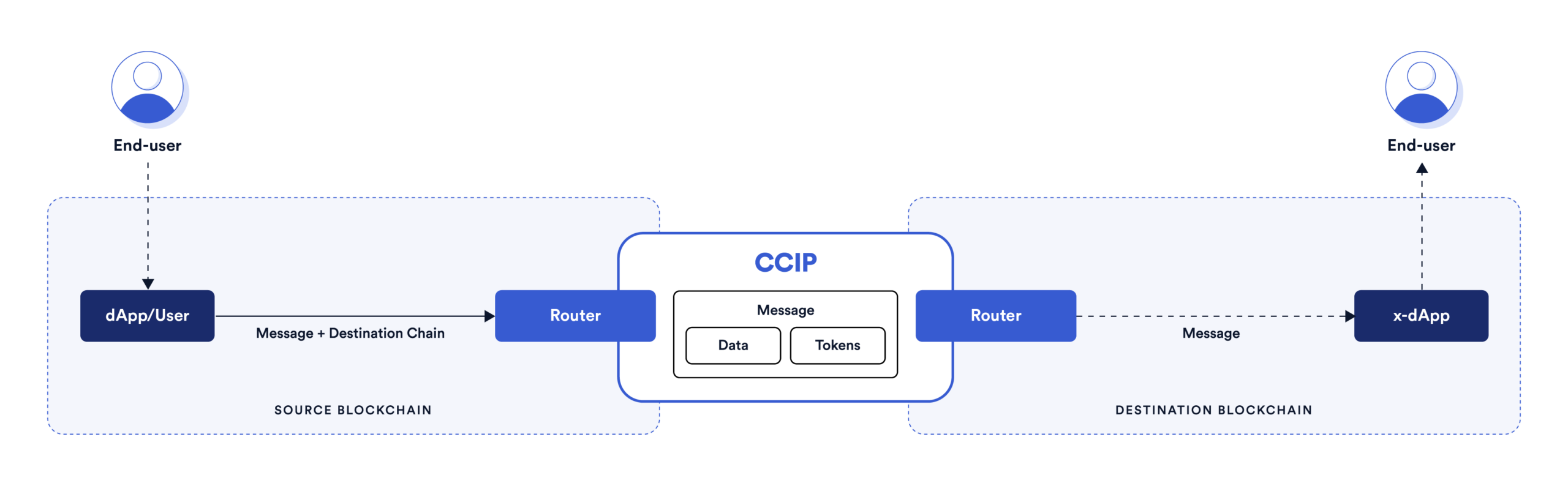
    Chainlink Cross-Chain Interoperability Protocol (CCIP) provides a single, simple, and elegant interface through which dApps and web3 entrepreneurs can securely meet all their cross-chain needs, including token transfers and arbitrary messaging.

    basic-architecture

    With Chainlink CCIP, one can:

    • Transfer supported tokens
    • Send messages (any data)
    • Send messages and tokens

    CCIP receiver can be:

    • Smart contract that implements CCIPReceiver.sol
    • EOA

    Note: If you send a message and token(s) to EOA, only tokens will arrive

    To use this project, you can consider CCIP as a “black-box” component and be aware of the Router contract only. If you want to dive deep into it, check the Official Chainlink Documentation.

    Usage

    In the next section you can see a couple of basic Chainlink CCIP use case examples. But before that, you need to set up some environment variables.

    Create a new file by copying the .env.example file, and name it .env. Fill in your wallet’s PRIVATE_KEY, and RPC URLs for at least two blockchains

    PRIVATE_KEY=""
    ETHEREUM_SEPOLIA_RPC_URL=""
    OPTIMISM_GOERLI_RPC_URL=""
    AVALANCHE_FUJI_RPC_URL=""
    ARBITRUM_TESTNET_RPC_URL=""
    POLYGON_MUMBAI_RPC_URL=""

    Once that is done, to load the variables in the .env file, run the following command:

    source .env

    Make yourself familiar with the Helper.sol smart contract. It contains all the necessary Chainlink CCIP config. If you ever need to adjust any of those parameters, go to the Helper contract.

    This contract also contains some enums, like SupportedNetworks:

    enum SupportedNetworks {
        ETHEREUM_SEPOLIA,   // 0
        OPTIMISM_GOERLI,    // 1
        AVALANCHE_FUJI,     // 2
        ARBITRUM_GOERLI,    // 3
        POLYGON_MUMBAI      // 4
    }

    This means that if you want to perform some action from AVALANCHE_FUJI blockchain to ETHEREUM_SEPOLIA blockchain, for example, you will need to pass 2 (uint8) as a source blockchain flag and 0 (uint8) as a destination blockchain flag.

    Similarly, there is an PayFeesIn enum:

    enum PayFeesIn {
        Native,  // 0
        LINK     // 1
    }

    So, if you want to pay for Chainlink CCIP fees in LINK token, you will pass 1 (uint8) as a function argument.

    Faucet

    You will need test tokens for some of the examples in this Starter Kit. Public faucets sometimes limit how many tokens a user can create and token pools might not have enough liquidity. To resolve these issues, CCIP supports two test tokens that you can mint permissionlessly so you don’t run out of tokens while testing different scenarios.

    To get 10**18 units of each of these tokens, use the script/Faucet.s.sol smart contract. Keep in mind that the CCIP-BnM test token you can mint on all testnets, while CCIP-LnM you can mint only on Ethereum Sepolia. On other testnets, the CCIP-LnM token representation is a wrapped/synthetic asset called clCCIP-LnM.

    function run(SupportedNetworks network) external;

    For example, to mint 10**18 units of both CCIP-BnM and CCIP-LnM test tokens on Ethereum Sepolia, run:

    forge script ./script/Faucet.s.sol -vvv --broadcast --rpc-url ethereumSepolia --sig "run(uint8)" -- 0

    Or if you want to mint 10**18 units of CCIP-BnM test token on Avalanche Fuji, run:

    forge script ./script/Faucet.s.sol -vvv --broadcast --rpc-url avalancheFuji --sig "run(uint8)" -- 2

    Example 1 – Transfer Tokens from EOA to EOA

    To transfer tokens from one EOA on one blockchain to another EOA on another blockchain you can use the script/Example01.s.sol smart contract:

    function run(
        SupportedNetworks source,
        SupportedNetworks destination,
        address receiver,
        address tokenToSend,
        uint256 amount,
        PayFeesIn payFeesIn
    ) external returns (bytes32 messageId);

    For example, if you want to send 0.0000000000000001 LINK from Avalanche Fuji to Ethereum Sepolia and to pay for CCIP fees in native coin (Test AVAX), run:

    forge script ./script/Example01.s.sol -vvv --broadcast --rpc-url avalancheFuji --sig "run(uint8,uint8,address,address,uint256,uint8)" -- 2 0 <RECEIVER_ADDRESS> 0x0b9d5D9136855f6FEc3c0993feE6E9CE8a297846 100 0

    Example 2 – Transfer Tokens from EOA to Smart Contract

    To transfer tokens from EOA from the source blockchain to the smart contract on the destination blockchain, follow the next steps:

    1. Deploy BasicMessageReceiver.sol to the destination blockchain, using the script/Example02.s.sol:DeployBasicMessageReceiver smart contract:
    function run(SupportedNetworks destination) external;

    For example, to deploy it to Ethereum Sepolia, run:

    forge script ./script/Example02.s.sol:DeployBasicMessageReceiver -vvv --broadcast --rpc-url ethereumSepolia --sig "run(uint8)" -- 0
    1. Transfer tokens, from the source blockchain to the deployed BasicMessageReceiver smart contract using the script/Example02.s.sol:CCIPTokenTransfer smart contract:
    function run(
        SupportedNetworks source,
        SupportedNetworks destination,
        address basicMessageReceiver,
        address tokenToSend,
        uint256 amount,
        PayFeesIn payFeesIn
    ) external returns (bytes32 messageId);

    For example, if you want to send 0.0000000000000001 LINK from Avalanche Fuji to Ethereum Sepolia and to pay for CCIP fees in native coin (Test AVAX), run:

    forge script ./script/Example02.s.sol:CCIPTokenTransfer -vvv --broadcast --rpc-url avalancheFuji --sig "run(uint8,uint8,address,address,uint256,uint8)" -- 2 0 <BASIC_MESSAGE_RECEIVER_ADDRESS> 0x0b9d5D9136855f6FEc3c0993feE6E9CE8a297846 100 0
    1. Once the CCIP message is finalized on the destination blockchain, you can see the details about the latest message using the script/Example02.s.sol:GetLatestMessageDetails smart contract:
    function run(address basicMessageReceiver) external view;

    For example,

    forge script ./script/Example02.s.sol:GetLatestMessageDetails -vvv --broadcast --rpc-url ethereumSepolia --sig "run(address)" -- <BASIC_MESSAGE_RECEIVER_ADDRESS>
    1. Finally, you can always withdraw received tokens from the BasicMessageReceiver.sol smart contract using the cast send command.

    For example, to withdraw 100 units of LINK previously sent, run:

    cast send <BASIC_MESSAGE_RECEIVER_ADDRESS> --rpc-url ethereumSepolia --private-key=$PRIVATE_KEY "withdrawToken(address,address)" <BENEFICIARY_ADDRESS> 0x779877A7B0D9E8603169DdbD7836e478b4624789

    Example 3 – Transfer Token(s) from Smart Contract to any destination

    To transfer a token or batch of tokens from a single, universal, smart contract to any address on the destination blockchain follow the next steps:

    1. Deploy BasicTokenSender.sol to the source blockchain, using the script/Example03.s.sol:DeployBasicTokenSender smart contract:
    function run(SupportedNetworks source) external;

    For example, if you want to send tokens from Avalanche Fuji to Ethereum Sepolia, run:

    forge script ./script/Example03.s.sol:DeployBasicTokenSender -vvv --broadcast --rpc-url avalancheFuji --sig "run(uint8)" -- 2
    1. [OPTIONAL] If you want to send tokens to the smart contract, instead of EOA, you will need to deploy BasicMessageReceiver.sol to the destination blockchain. For this purpose, you can reuse the script/Example02.s.sol:DeployBasicMessageReceiver smart contract from the previous example:
    function run(SupportedNetworks destination) external;

    For example, to deploy it to Ethereum Sepolia, run:

    forge script ./script/Example02.s.sol:DeployBasicMessageReceiver -vvv --broadcast --rpc-url ethereumSepolia --sig "run(uint8)" -- 0
    1. Fill the BasicTokenSender.sol with tokens/coins for fees (you can always withdraw it later). You can do it manually from your wallet or by using the cast send command.

    For example, if you want to pay for Chainlink CCIP Fees in LINK tokens, you can fill the BasicTokenSender.sol smart contract with 0.01 Avalanche Fuji LINK by running:

    cast send 0x0b9d5D9136855f6FEc3c0993feE6E9CE8a297846 "transfer(address,uint256)" <BASIC_TOKEN_SENDER_ADDRESS> 10000000000000000 --rpc-url avalancheFuji --private-key=$PRIVATE_KEY

    Or, if you want to pay for Chainlink CCIP Fees in Native coins, you can fill the BasicTokenSender.sol smart contract with 0.1 Avalanche Fuji AVAX by running:

    cast send <BASIC_TOKEN_SENDER_ADDRESS> --rpc-url avalancheFuji --private-key=$PRIVATE_KEY --value 0.1ether
    1. For each token you want to send, you will need to approve the BasicTokenSender.sol to spend it on your behalf, by using the cast send command.

    For example, if you want to send 0.0000000000000001 CCIP-BnM using the BasicTokenSender.sol you will first need to approve that amount:

    cast send 0xD21341536c5cF5EB1bcb58f6723cE26e8D8E90e4 "approve(address,uint256)" <BASIC_TOKEN_SENDER_ADDRESS> 100 --rpc-url avalancheFuji --private-key=$PRIVATE_KEY

    Or, if you want to send 0.0000000000000001 LINK using the BasicTokenSender.sol you will first need to approve that amount:

    cast send 0x0b9d5D9136855f6FEc3c0993feE6E9CE8a297846 "approve(address,uint256)" <BASIC_TOKEN_SENDER_ADDRESS> 100 --rpc-url avalancheFuji --private-key=$PRIVATE_KEY
    1. Finally, send tokens by providing the array of Client.EVMTokenAmount {address token; uint256 amount;} objects, using the script/Example03.s.sol:SendBatch smart contract:
    function run(
        SupportedNetworks destination,
        address payable basicTokenSenderAddres,
        address receiver,
        Client.EVMTokenAmount[] memory tokensToSendDetails,
        BasicTokenSender.PayFeesIn payFeesIn
    ) external;

    For example, to send CCIP-BnM and LINK token amounts you previously approved from Avalanche Fuji to Ethereum Sepolia, and pay for Chainlink CCIP fees in LINK tokens, run:

    forge script ./script/Example03.s.sol:SendBatch -vvv --broadcast --rpc-url avalancheFuji --sig "run(uint8,address,address,(address,uint256)[],uint8)" -- 0 <BASIC_TOKEN_SENDER_ADDRESS> <RECEIVER> "[(0xD21341536c5cF5EB1bcb58f6723cE26e8D8E90e4,100),(0x0b9d5D9136855f6FEc3c0993feE6E9CE8a297846,100)]" 1
    1. Of course, you can always withdraw tokens you sent to the BasicTokenSender.sol for fees, or from BasicMessageReceiver.sol if you received them there.

    For example, to withdraw ERC20 tokens, run:

    cast send <CONTRACT_WITH_FUNDS_ADDRESS> --rpc-url <RPC_ENDPOINT> --private-key=$PRIVATE_KEY "withdrawToken(address,address)" <BENEFICIARY_ADDRESS> <TOKEN_TO_WITHDRAW_ADDRESS>

    And to withdraw Native coins, run:

    cast send <CONTRACT_WITH_FUNDS_ADDRESS> --rpc-url <RPC_ENDPOINT> --private-key=$PRIVATE_KEY "withdraw(address)" <BENEFICIARY_ADDRESS>

    Example 4 – Send & Receive Tokens and Data

    To transfer tokens and data across multiple chains, follow the next steps:

    1. Deploy the ProgrammableTokenTransfers.sol smart contract to the source blockchain, using the script/Example04.s.sol:DeployProgrammableTokenTransfers smart contract:
    function run(SupportedNetworks network) external;

    For example, if you want to send a message from Avalanche Fuji to Ethereum Sepolia type:

    forge script ./script/Example04.s.sol:DeployProgrammableTokenTransfers -vvv --broadcast --rpc-url avalancheFuji --sig "run(uint8)" -- 2
    1. Open Metamask and fund your contract with Native tokens. For example, if you want to send a message from Avalanche Fuji to Ethereum Sepolia, you can send 0.01 Fuji AVAX to your contract. You can also do the same thing using the cast send command:
    cast send <PROGRAMMABLE_TOKEN_TRANSFERS_ADDRESS> --rpc-url avalancheFuji --private-key=$PRIVATE_KEY --value 0.1ether
    1. Open Metamask and fund your contract with LINK tokens. For example, if you want to send a message from Avalanche Fuji to Ethereum Sepolia, you can send a 0.001 Fuji LINK to your contract. You can also do the same thing using the cast send command:
    cast send 0x0b9d5D9136855f6FEc3c0993feE6E9CE8a297846 "transfer(address,uint256)" <PROGRAMMABLE_TOKEN_TRANSFERS_ADDRESS> 10000000000000000 --rpc-url avalancheFuji --private-key=$PRIVATE_KEY
    1. Deploy the ProgrammableTokenTransfers.sol smart contract to the destination blockchain, using the script/Example04.s.sol:DeployProgrammableTokenTransfers smart contract, as you did in step number one.

    For example, if you want to receive a message from Avalanche Fuji on Ethereum Sepolia type:

    forge script ./script/Example04.s.sol:DeployProgrammableTokenTransfers -vvv --broadcast --rpc-url ethereumSepolia --sig "run(uint8)" -- 0

    At this point, you have one sender contract on the source blockchain, and one receiver contract on the destination blockchain. Please note that ProgrammableTokenTransfers.sol can both send & receive tokens and data, hence we have two identical instances on both source and destination blockchains.

    1. Send a message, using the script/Example04.s.sol:SendTokensAndData smart contract:
    function run(
        address payable sender,
        SupportedNetworks destination,
        address receiver,
        string memory message,
        address token,
        uint256 amount
    ) external;

    For example, if you want to send a “Hello World” message alongside 100 units of Fuji LINK from Avalanche Fuji to Ethereum Sepolia, type:

    forge script ./script/Example04.s.sol:SendTokensAndData -vvv --broadcast --rpc-url avalancheFuji --sig "run(address,uint8,address,string,address,uint256)" -- <PROGRAMMABLE_TOKEN_TRANSFERS_ADDRESS_ON_SOURCE_BLOCKCHAIN> 0 <PROGRAMMABLE_TOKEN_TRANSFERS_ADDRESS_ON_DESTINATION_BLOCKCHAIN> "Hello World" 0x0b9d5D9136855f6FEc3c0993feE6E9CE8a297846 100
    1. Once the CCIP message is finalized on the destination blockchain, you can see the details of the latest CCIP message received, by running the following command:
    cast call <PROGRAMMABLE_TOKEN_TRANSFERS_ADDRESS_ON_DESTINATION_BLOCKCHAIN> "getLastReceivedMessageDetails()" --rpc-url ethereumSepolia

    Example 5 – Send & Receive Cross-Chain Messages and Pay with Native Coins

    To send simple Text Cross-Chain Messages and pay for CCIP fees in Native Tokens, follow the next steps:

    1. Deploy the BasicMessageSender.sol smart contract on the source blockchain, using the script/Example05.s.sol:DeployBasicMessageSender smart contract:
    function run(SupportedNetworks source) external;

    For example, if you want to send a simple cross-chain message from Avalanche Fuji, run:

    forge script ./script/Example05.s.sol:DeployBasicMessageSender -vvv --broadcast --rpc-url avalancheFuji --sig "run(uint8)" -- 2
    1. Fund the BasicMessageSender.sol smart contract with Native Coins, either manually using your wallet or by using the cast send command. For example, if you want to send 0.1 Fuji AVAX, run:
    cast send <BASIC_MESSAGE_SENDER_ADDRESS> --rpc-url avalancheFuji --private-key=$PRIVATE_KEY --value 0.1ether
    1. Deploy the BasicMessageReceiver.sol smart contract to the destination blockchain. For this purpose, you can reuse the script/Example02.s.sol:DeployBasicMessageReceiver smart contract from the second example:
    function run(SupportedNetworks destination) external;

    For example, to deploy it to Ethereum Sepolia, run:

    forge script ./script/Example02.s.sol:DeployBasicMessageReceiver -vvv --broadcast --rpc-url ethereumSepolia --sig "run(uint8)" -- 0
    1. Finally, send a cross-chain message using the script/Example05.s.sol:SendMessage smart contract:
    function run(
        address payable sender,
        SupportedNetworks destination,
        address receiver,
        string memory message,
        BasicMessageSender.PayFeesIn payFeesIn
    ) external;

    For example, if you want to send a “Hello World” message type:

    forge script ./script/Example05.s.sol:SendMessage -vvv --broadcast --rpc-url avalancheFuji --sig "ru
    n(address,uint8,address,string,uint8)" -- <BASIC_MESSAGE_SENDER_ADDRESS> 0 <BASIC_MESSAGE_RECEIVER_ADDRESS> "Hello World"
    0
    1. Once the CCIP message is finalized on the destination blockchain, you can see the details about the latest message using the script/Example02.s.sol:GetLatestMessageDetails smart contract:
    function run(address basicMessageReceiver) external view;

    For example,

    forge script ./script/Example02.s.sol:GetLatestMessageDetails -vvv --broadcast --rpc-url ethereumSepolia --sig "run(address)" -- <BASIC_MESSAGE_RECEIVER_ADDRESS>
    1. You can always withdraw tokens for Chainlink CCIP fees from the BasicMessageSender.sol smart contract using the cast send command:
    cast send <BASIC_MESSAGE_SENDER_ADDRESS> --rpc-url avalancheFuji --private-key=$PRIVATE_KEY "withdraw(address)" <BENEFICIARY_ADDRESS>

    Example 6 – Send & Receive Cross-Chain Messages and Pay with LINK Tokens

    To send simple Text Cross-Chain Messages and pay for CCIP fees in LINK Tokens, follow the next steps:

    1. Deploy the BasicMessageSender.sol smart contract on the source blockchain, using the script/Example05.s.sol:DeployBasicMessageSender smart contract:
    function run(SupportedNetworks source) external;

    For example, if you want to send a simple cross-chain message from Avalanche Fuji, run:

    forge script ./script/Example05.s.sol:DeployBasicMessageSender -vvv --broadcast --rpc-url avalancheFuji --sig "run(uint8)" -- 2
    1. Fund the BasicMessageSender.sol smart contract with Testnet LINKs, either manually using your wallet or by using the cast send command. For example, if you want to send 0.01 Fuji LINK, run:
    cast send 0x0b9d5D9136855f6FEc3c0993feE6E9CE8a297846 "transfer(address,uint256)" <BASIC_MESSAGE_SENDER_ADDRESS> 10000000000000000 --rpc-url avalancheFuji --private-key=$PRIVATE_KEY
    1. Deploy the BasicMessageReceiver.sol smart contract to the destination blockchain. For this purpose, you can reuse the script/Example02.s.sol:DeployBasicMessageReceiver smart contract from the second example:
    function run(SupportedNetworks destination) external;

    For example, to deploy it to Ethereum Sepolia, run:

    forge script ./script/Example02.s.sol:DeployBasicMessageReceiver -vvv --broadcast --rpc-url ethereumSepolia --sig "run(uint8)" -- 0
    1. Finally, send a cross-chain message using the script/Example05.s.sol:SendMessage smart contract:
    function run(
        address payable sender,
        SupportedNetworks destination,
        address receiver,
        string memory message,
        BasicMessageSender.PayFeesIn payFeesIn
    ) external;

    For example, if you want to send a “Hello World” message type:

    forge script ./script/Example05.s.sol:SendMessage -vvv --broadcast --rpc-url avalancheFuji --sig "ru
    n(address,uint8,address,string,uint8)" -- <BASIC_MESSAGE_SENDER_ADDRESS> 0 <BASIC_MESSAGE_RECEIVER_ADDRESS> "Hello World"
    1
    1. Once the CCIP message is finalized on the destination blockchain, you can see the details about the latest message using the script/Example02.s.sol:GetLatestMessageDetails smart contract:
    function run(address basicMessageReceiver) external view;

    For example,

    forge script ./script/Example02.s.sol:GetLatestMessageDetails -vvv --broadcast --rpc-url ethereumSepolia --sig "run(address)" -- <BASIC_MESSAGE_RECEIVER_ADDRESS>
    1. You can always withdraw tokens for Chainlink CCIP fees from the BasicMessageSender.sol smart contract using the cast send command:
    cast send <BASIC_MESSAGE_SENDER_ADDRESS> --rpc-url avalancheFuji --private-key=$PRIVATE_KEY "withdrawToken(address,address)" <BENEFICIARY_ADDRESS> 0x0b9d5D9136855f6FEc3c0993feE6E9CE8a297846

    Example 7 – Execute Received Message as a Function Call

    Our goal for this example is to mint an NFT on the destination blockchain by sending the to address from the source blockchain. It is extremely simple so we can understand the basic concepts, but you can expand it to accept payment for minting on the source blockchain, add extra features, etc.

    The basic architecture diagram of what we want to accomplish looks like this:

    flowchart LR
    subgraph "Source Blockchain"
    a("SourceMinter.sol") -- "`send abi.encodeWithSignature('mint(address)', msg.sender);`" --> b("Source Router")
    end
    
    b("Source Router") --> c("CCIP")
    
    c("CCIP") --> d("Destination Router")
    
    subgraph "Destination Blockchain"
    d("Destination Router") -- "`receive abi.encodeWithSignature('mint(address)', msg.sender);`" --> e("DestinationMinter.sol")
    e("DestinationMinter.sol") -- "`call mint(to)`" --> f("MyNFT.sol")
    end
    
    Loading
    1. Deploy the MyNFT.sol and DestinationMinter.sol smart contracts from the ./src/cross-chain-nft-minter folder on the destination blockchain, by using the script/CrossChainNFT.s.sol:DeployDestination smart contract:
    function run(SupportedNetworks destination) external;

    For example, if you want to have an NFT collection on Ethereum Sepolia, run:

    forge script ./script/CrossChainNFT.s.sol:DeployDestination -vvv --broadcast --rpc-url ethereumSepolia --sig "run(uint8)" -- 0
    1. Deploy the SourceMinter.sol smart contract on the source blockchain, by using the script/CrossChainNFT.s.sol:DeploySource smart contract:
    function run(SupportedNetworks source) external;

    For example, if you want to mint NFTs on Ethereum Sepolia from Avalanche Fuji, run:

    forge script ./script/CrossChainNFT.s.sol:DeploySource -vvv --broadcast --rpc-url avalancheFuji --sig "run(uint8)" -- 2
    1. Fund the SourceMinter.sol smart contract with tokens for CCIP fees.
    • If you want to pay for CCIP fees in Native tokens:

      Open Metamask and fund your contract with Native tokens. For example, if you want to mint from Avalanche Fuji to Ethereum Sepolia, you can send 0.1 Fuji AVAX to the SourceMinter.sol smart contract.

      Or, you can use the cast send command:

      cast send <SOURCE_MINTER_ADDRESS> --rpc-url avalancheFuji --private-key=$PRIVATE_KEY --value 0.1ether
    • If you want to pay for CCIP fees in LINK tokens:

      Open Metamask and fund your contract with LINK tokens. For example, if you want to mint from Avalanche Fuji to Ethereum Sepolia, you can send 0.01 Fuji LINK to the SourceMinter.sol smart contract.

      Or, you can use the cast send command:

      cast send 0x0b9d5D9136855f6FEc3c0993feE6E9CE8a297846 "transfer(address,uint256)" <SOURCE_MINTER_ADDRESS> 10000000000000000 --rpc-url avalancheFuji --private-key=$PRIVATE_KEY
    1. Mint NFTs by calling the mint() function of the SourceMinter.sol smart contract on the source blockchain. It will send the CCIP Cross-Chain Message with the ABI-encoded mint function signature from the MyNFT.sol smart contract. The DestinationMinter.sol smart contracts will receive the CCIP Cross-Chain Message with the ABI-encoded mint function signature as a payload and call the MyNFT.sol smart contract using it. The MyNFT.sol smart contract will then mint the new NFT to the msg.sender account from the mint() function of the SourceMinter.sol smart contract, a.k.a to the account from which you will call the following command:
    function run(
        address payable sourceMinterAddress,
        SupportedNetworks destination,
        address destinationMinterAddress,
        SourceMinter.PayFeesIn payFeesIn
    ) external;

    For example, if you want to mint NFTs on Ethereum Sepolia by sending requests from Avalanche Fuji, run:

    forge script ./script/CrossChainNFT.s.sol:Mint -vvv --broadcast --rpc-url avalancheFuji --sig "run(a
    ddress,uint8,address,uint8)" -- <SOURCE_MINTER_ADDRESS> 0 <DESTINATION_MINTER_ADDRESS> 0
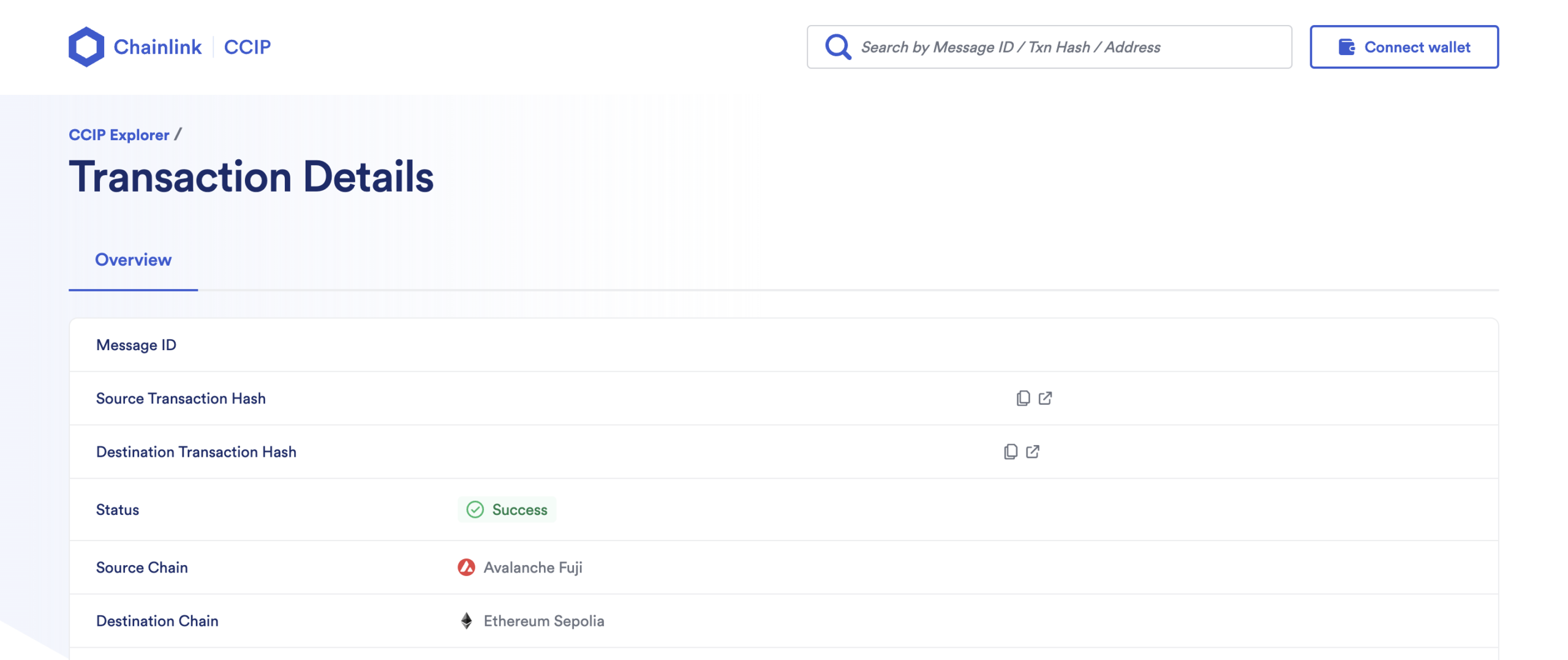
    1. Once the CCIP message is finalized on the destination blockchain, you can query the MyNFTs balance of your account, using the cast call command.

    ccip-explorer

    For example, to verify that the new MyNFT was minted, type:

    cast call <MY_NFT_ADDRESS> "balanceOf(address)" <PUT_YOUR_ADDRESS_HERE> --rpc-url ethereumSepolia

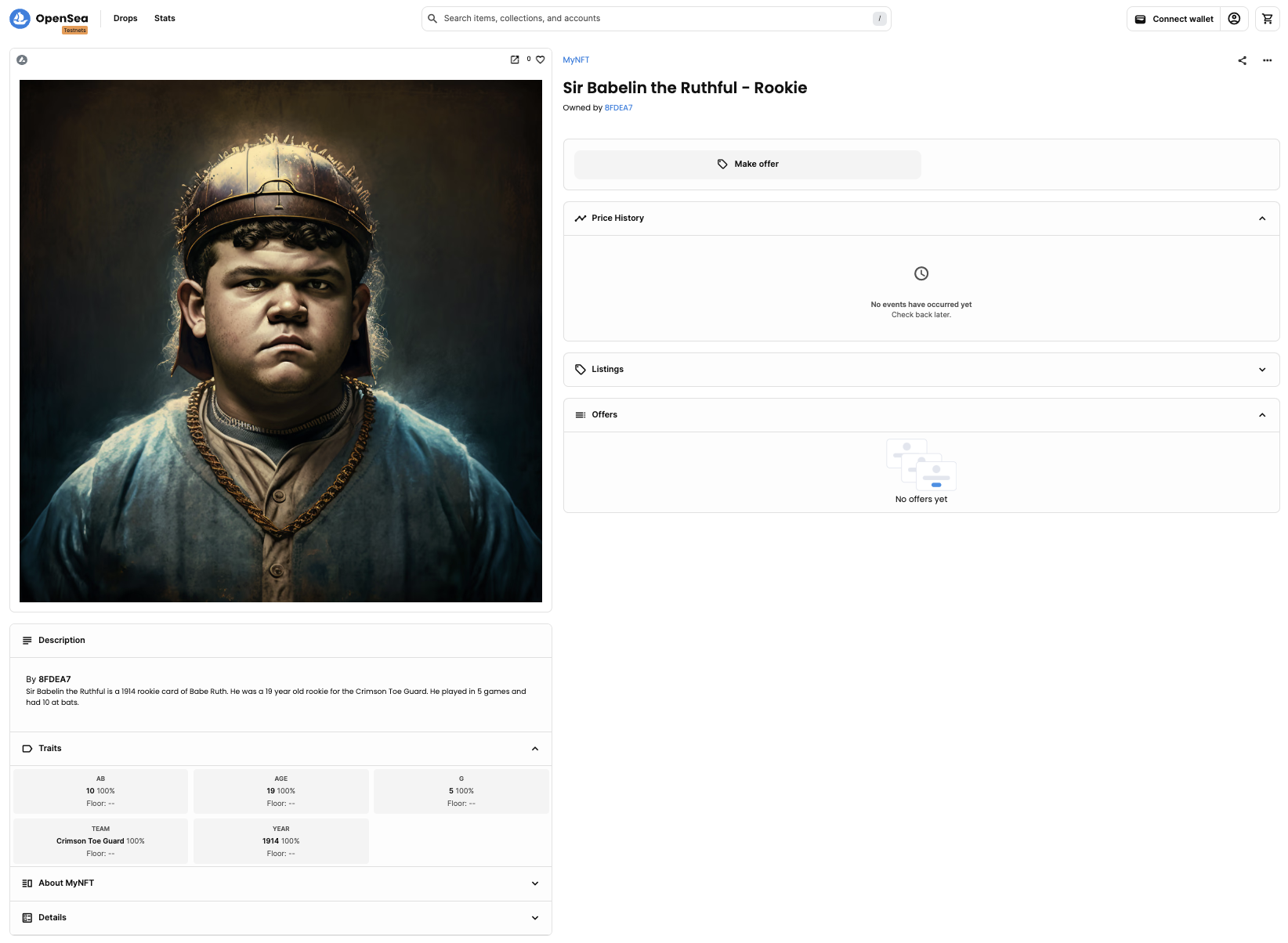
    Of course, you can see your newly minted NFT on popular NFT Marketplaces, like OpenSea for instance:

    opensea

    1. You can always withdraw tokens for Chainlink CCIP fees from the SourceMinter.sol smart contract using the cast send command.

    For example, to withdraw tokens previously sent for Chainlink CCIP fees, run:

    cast send <SOURCE_MINTER_ADDRESS> --rpc-url avalancheFuji --private-key=$PRIVATE_KEY "withdraw(address)" <BENEFICIARY_ADDRESS>

    or

    cast send <SOURCE_MINTER_ADDRESS> --rpc-url avalancheFuji --private-key=$PRIVATE_KEY "withdrawToken(address,address)" <BENEFICIARY_ADDRESS> 0x0b9d5D9136855f6FEc3c0993feE6E9CE8a297846

    depending on whether you filled the SourceMinter.sol contract with Native (0) or LINK (1) in step number 3.

    Visit original content creator repository
  • file_data

    file_data

    Build Status Coverage Status Code Climate Gem Version

    Ruby library that reads file metadata.

    Basic Usage for an Exif File

    require 'file_data'
    
    ## Step 1: Read in the exif data using either a file path or a stream
    
    # Using a file path...
    file_path = '/home/user/desktop/my_file.jpg' # Path to an exif file
    exif_data = FileData::Exif.all_data(file_path) # read in all of the exif data from the file path
    
    # Or using a stream...
    exif_data = File.open(file_path, 'rb') do |f|
      FileData::Exif.all_data(f)
    end
    
    ## Step 2: Data is divided into image data and thumbnail data. Pick which you want to work with.
    
    # Both objects are hash-like and should respond to all hash method except .length which instead will return the value of :Image_Structure_Length,
    image_data = exif_data.image
    thumbnail_data = exif_data.thumbnail
    
    ## Step 3: Extract the tag values
    
    ### Step 3A: Extract tags with a known name (ones that are listed in the "Known Tag Keys" section below)
    
    # Convenience methods are added for the names after the last underscore in the known tag names (casing and underscores are ignored in the convenince method names)
    
    bits_per_sample = image_data.BitsPerSample # Gets :Image_Structure_BitsPerSample from the :Tiff section
    bits_per_sample = image_data.bits_per_sample # Also gets :Image_Structure_BitsPerSample from the :Tiff section
    
    ### Step 3B: Extract tags without a known name (ones NOT listed in the "Known Tag Keys" section below)
    
    # Use the format "#{ifd_id}-#{tag_id}" for the unknown tag to key into the data
    unknown_gps_tag_value = image_data["34853-99999"]

    Known Tag Keys

    Below is the contents of FileData::ExifTags.tag_groups which lists all known tag keys and their uniquely assigned names

    # Tiff Tags (0th and 1st IFDs)
    FileData::ExifTags.tag_groups[:Tiff] =
      {
        256 => :Image_Structure_Width,
        257 => :Image_Structure_Length,
        258 => :Image_Structure_BitsPerSample,
        259 => :Image_Structure_Compression,
        262 => :Image_Structure_PhotometricInterpretation,
        270 => :Other_ImageDescription,
        271 => :Other_Make,
        272 => :Other_Model,
        273 => :Recording_StripOffsets,
        274 => :Image_Structure_Orientation,
        277 => :Image_Structure_SamplesPerPixel,
        278 => :Recording_RowsPerStrip,
        279 => :Recording_StripByteCounts,
        283 => :Image_Structure_YResolution,
        284 => :Image_Structure_PlanarConfiguration,
        296 => :Image_Structure_ResolutionUnit,
        301 => :Image_Data_TransferFunction,
        305 => :Other_Software,
        306 => :Other_DateTime,
        315 => :Other_Artist,
        318 => :Image_Data_WhitePoint,
        319 => :Image_Data_PrimaryChromaticities,
        513 => :Recording_JPEGInterchangeFormat,
        514 => :Recording_JPEGInterchangeFormatLength,
        529 => :Image_Data_YCbCrCoefficients,
        530 => :Image_Structure_YCbCrSubSampling,
        531 => :Image_Structure_YCbCrPositioning,
        532 => :Image_Data_ReferenceBlackWhite,
        33_432 => :Other_Copyright
      }
    
    # Exif IFD Tags
    FileData::ExifTags.tag_groups[34_665] =
      {
        33_434 => :Exif_PictureTakingConditions_ExposureTime,
        33_437 => :Exif_PictureTakingConditions_FNumber,
        34_850 => :Exif_PictureTakingConditions_ExposureProgram,
        34_852 => :Exif_PictureTakingConditions_SpectralSensitivity,
        34_855 => :Exif_PictureTakingConditions_PhotographicSensitivity,
        34_856 => :Exif_PictureTakingConditions_OECF,
        34_864 => :Exif_PictureTakingConditions_SensitivityType,
        34_865 => :Exif_PictureTakingConditions_StandardOutputSensitivity,
        34_866 => :Exif_PictureTakingConditions_RecommendedExposureIndex,
        34_867 => :Exif_PictureTakingConditions_ISOSpeed,
        34_868 => :Exif_PictureTakingConditions_ISOSpeedLatitudeyyy,
        34_869 => :Exif_PictureTakingConditions_ISOSpeedLatitudezzz,
        36_864 => :Exif_Version_ExifVersion,
        36_867 => :Exif_DateAndTime_DateTimeOriginal,
        36_868 => :Exif_DateAndTime_DateTimeDigitized,
        37_121 => :Exif_Configuration_ComponentsConfiguration,
        37_122 => :Exif_Configuration_CompressedBitsPerPixel,
        37_377 => :Exif_PictureTakingConditions_ShutterSpeedValue,
        37_378 => :Exif_PictureTakingConditions_ApertureValue,
        37_379 => :Exif_PictureTakingConditions_BrightnessValue,
        37_380 => :Exif_PictureTakingConditions_ExposureBiasValue,
        37_381 => :Exif_PictureTakingConditions_MaxApertureValue,
        37_382 => :Exif_PictureTakingConditions_SubjectDistance,
        37_383 => :Exif_PictureTakingConditions_MeteringMode,
        37_384 => :Exif_PictureTakingConditions_LightSource,
        37_385 => :Exif_PictureTakingConditions_Flash,
        37_396 => :Exif_PictureTakingConditions_SubjectArea,
        37_386 => :Exif_PictureTakingConditions_FocalLength,
        37_500 => :Exif_Configuration_MakerNote,
        37_510 => :Exif_Configuration_UserComment,
        37_520 => :Exif_DateAndTime_SubsecTime,
        37_521 => :Exif_DateAndTime_SubsecTimeOriginal,
        37_522 => :Exif_DateAndTime_SubsecTimeDigitized,
        37_888 => :Exif_ShootingSituation_Temperature,
        37_889 => :Exif_ShootingSituation_Humidity,
        37_890 => :Exif_ShootingSituation_Pressure,
        37_891 => :Exif_ShootingSituation_WaterDepth,
        37_892 => :Exif_ShootingSituation_Acceleration,
        37_893 => :Exif_ShootingSituation_CameraElevationAngle,
        40_960 => :Exif_Version_FlashpixVersion,
        40_961 => :Exif_ColorSpace_ColorSpace,
        40_962 => :Exif_Configuration_PixelXDimension,
        40_963 => :Exif_Configuration_PixelYDimension,
        40_964 => :Exif_RelatedFile_RelatedSoundFile,
        41_483 => :Exif_PictureTakingConditions_FlashEnergy,
        41_484 => :Exif_PictureTakingConditions_SpatialFrequencyResponse,
        41_486 => :Exif_PictureTakingConditions_FocalPlaneXResolution,
        41_487 => :Exif_PictureTakingConditions_FocalPlaneYResolution,
        41_488 => :Exif_PictureTakingConditions_FocalPlanResolutionUnit,
        41_492 => :Exif_PictureTakingConditions_SubjectLocation,
        41_493 => :Exif_PictureTakingConditions_ExposureIndex,
        41_495 => :Exif_PictureTakingConditions_SensingMode,
        41_728 => :Exif_PictureTakingConditions_FileSource,
        41_729 => :Exif_PictureTakingConditions_SceneType,
        41_730 => :Exif_PictureTakingConditions_CFAPattern,
        41_985 => :Exif_PictureTakingConditions_CustomRendered,
        41_986 => :Exif_PictureTakingConditions_ExposureMode,
        41_987 => :Exif_PictureTakingConditions_WhiteBalance,
        41_988 => :Exif_PictureTakingConditions_DigitalZoomRatio,
        41_989 => :Exif_PictureTakingConditions_FocalLengthIn35mmFilm,
        41_990 => :Exif_PictureTakingConditions_SceneCaptureType,
        41_991 => :Exif_PictureTakingConditions_GainControl,
        41_992 => :Exif_PictureTakingConditions_Contrast,
        41_993 => :Exif_PictureTakingConditions_Saturation,
        41_994 => :Exif_PictureTakingConditions_Sharpness,
        41_995 => :Exif_PictureTakingConditions_DeviceSettingDescription,
        41_996 => :Exif_PictureTakingConditions_SubjectDistanceRange,
        42_016 => :Exif_Other_ImageUniqueID,
        42_032 => :Exif_Other_CameraOwnerName,
        42_033 => :Exif_Other_BodySerialNumber,
        42_034 => :Exif_Other_LensSpecification,
        42_035 => :Exif_Other_LensMake,
        42_036 => :Exif_Other_LensModel,
        42_037 => :Exif_Other_LensSerialNumber,
        42_240 => :Exif_ColorSpace_Gamma
      }
    
    # GPS IFD Tags
    FileData::ExifTags.tag_groups[34_853] =
      {
        0 => :GPS_Version,
        1 => :GPS_LatitudeRef,
        2 => :GPS_Latitude,
        3 => :GPS_LongitudeRef,
        4 => :GPS_Longitude,
        5 => :GPS_AltitudeRef,
        6 => :GPS_Altitude,
        7 => :GPS_TimeStamp,
        8 => :GPS_Satellites,
        9 => :GPS_Status,
        10 => :GPS_MeasureMode,
        11 => :GPS_DOP,
        12 => :GPS_SpeedRef,
        13 => :GPS_Speed,
        14 => :GPS_TrackRef,
        15 => :GPS_Track,
        16 => :GPS_ImgDirectionRef,
        17 => :GPS_ImgDirection,
        18 => :GPS_MapDatum,
        19 => :GPS_DestLatitudeRef,
        20 => :GPS_DestLatitude,
        21 => :GPS_DestLongitudeRef,
        22 => :GPS_DestLongitude,
        23 => :GPS_DestBearingRef,
        24 => :GPS_DestBearing,
        25 => :GPS_DestDistanceRef,
        26 => :GPS_DestDistance,
        27 => :GPS_ProcessingMethod,
        28 => :GPS_AreaInformation,
        29 => :GPS_DateStamp,
        30 => :GPS_Differential,
        31 => :GPS_HPositioningError
      }
    
    # Interoperability IFD Tags
    FileData::ExifTags.tag_groups[40_965] =
      {
        1 => :Interoperability_Index
      }

    Mpeg4 documentation

    filepath = '...' # path to an mpeg4 file
    File.open(filepath, 'rb') do |stream|
      parser = FileData::MvhdBoxParser # class that parses the box you want
      method = :creation_time # attribute to get from the parse result
      box_path = ['moov', 'mvhd'] # path to get to the box that you want
    
      # final result that you are looking for
      result = FileData::Mpeg4.get_value(stream, parser, method, *box_path)
    end
    Visit original content creator repository
  • RedUtils

    RedUtilities

    A set of utitilies for making rocket league bots in C#

    Usage Instructions

    Prerequisites

    Make sure you’ve installed .NET SDK 6.0 x64,
    AND make sure you’ve installed Python 3.7 64 bit or newer. During installation:

    • Select “Add Python to PATH”
    • Make sure pip is included in the installation

    Set up RLBotGUI

    1. Set up and install the RLBotGUI, by following this along with this video.
    2. Use Add -> Load folder in RLBotGUI on the current directory. This bot should appear in the list.

    Using Visual Studio

    1. Install Visual Studio 2019 16.8 or newer.
    2. Open Bot.sln in Visual Studio.
    3. Edit the code as you see fit, and then compile
    4. In RLBotGUI, put the bot on a team and start the match.

    Using Rider

    1. Install Rider. If you do not have Visual Studio installed alongside Rider, follow this article to set up Rider.
    2. Open Bot.sln in Rider.
    3. Edit the code as you see fit, and then compile
    4. In RLBotGUI, put the bot on a team and start the match.

    Upgrades

    This project uses a package manager called NuGet to keep track of the RLBot framework.
    The framework will get updates periodically, and you’ll probably want them, especially if you want to make sure
    your bot will work right in the next tournament!

    Upgrading in Visual Studio

    1. In Visual Studio, right click on the Bot C# project and choose “Manage NuGet Packages…”
    2. Click on the “Installed” tab. You should see a package called “RLBot.Framework”.
    3. If an upgrade is available, it should say so and give you the option to upgrade.

    Upgrading in Rider

    1. In Rider, right click on the Bot C# project and choose “Manage NuGet Packages”.
    2. In the “Installed Packages” section, click on the package called “RLBot.Framework”.
    3. If the “Version” dropdown contains a higher version than what your project currently has, you can select that version and click the Upgrade button next to the dropdown to upgrade.

    Notes

    • Bot name, description, etc, is configured by Bot.cfg
    • Bot strategy is controlled by Bot/Bot.cs
    • Bot appearance is controlled by Loadouts/loadout_generator.py
    • To make your bot run as fast as possible, build it in release mode, and then change the “executable_path” in Bot.cfg to ./Bot/bin/Release/net6.0/Bot.exe
    • See the wiki for tips to improve your programming experience.
    • If you’d like to keep up with bot strategies and bot tournaments, join our Discord server. It’s the heart of the RLBot community!

    Overview of how the C# bot interacts with Python

    The C# bot executable is a server that listens for Python clients.
    When python_run_file.py is started by the RLBot framework, it connects to the C# bot server and tells it its info.
    Then, the C# bot server controls the bot through the RLBot_Core_Interface DLL.

    Credit

    • ddthj/GoslingUtils for inspiration on some of the structure and code (which I ported to c#)
    • VirxEC/VirxERLU for the basis of my aerial code (which I ported to c#)
    • Darxeal/BotimusPrime for inspiration on some of the structure and driving code (which I ported to c#)

    Visit original content creator repository

  • Historia_clinica_psicologica

                        GNU GENERAL PUBLIC LICENSE
                           Version 2, June 1991
    
     Copyright (C) 1989, 1991 Free Software Foundation, Inc.,
     51 Franklin Street, Fifth Floor, Boston, MA 02110-1301 USA
     Everyone is permitted to copy and distribute verbatim copies
     of this license document, but changing it is not allowed.
    
                                Preamble
    
      The licenses for most software are designed to take away your
    freedom to share and change it.  By contrast, the GNU General Public
    License is intended to guarantee your freedom to share and change free
    software--to make sure the software is free for all its users.  This
    General Public License applies to most of the Free Software
    Foundation's software and to any other program whose authors commit to
    using it.  (Some other Free Software Foundation software is covered by
    the GNU Lesser General Public License instead.)  You can apply it to
    your programs, too.
    
      When we speak of free software, we are referring to freedom, not
    price.  Our General Public Licenses are designed to make sure that you
    have the freedom to distribute copies of free software (and charge for
    this service if you wish), that you receive source code or can get it
    if you want it, that you can change the software or use pieces of it
    in new free programs; and that you know you can do these things.
    
      To protect your rights, we need to make restrictions that forbid
    anyone to deny you these rights or to ask you to surrender the rights.
    These restrictions translate to certain responsibilities for you if you
    distribute copies of the software, or if you modify it.
    
      For example, if you distribute copies of such a program, whether
    gratis or for a fee, you must give the recipients all the rights that
    you have.  You must make sure that they, too, receive or can get the
    source code.  And you must show them these terms so they know their
    rights.
    
      We protect your rights with two steps: (1) copyright the software, and
    (2) offer you this license which gives you legal permission to copy,
    distribute and/or modify the software.
    
      Also, for each author's protection and ours, we want to make certain
    that everyone understands that there is no warranty for this free
    software.  If the software is modified by someone else and passed on, we
    want its recipients to know that what they have is not the original, so
    that any problems introduced by others will not reflect on the original
    authors' reputations.
    
      Finally, any free program is threatened constantly by software
    patents.  We wish to avoid the danger that redistributors of a free
    program will individually obtain patent licenses, in effect making the
    program proprietary.  To prevent this, we have made it clear that any
    patent must be licensed for everyone's free use or not licensed at all.
    
      The precise terms and conditions for copying, distribution and
    modification follow.
    
                        GNU GENERAL PUBLIC LICENSE
       TERMS AND CONDITIONS FOR COPYING, DISTRIBUTION AND MODIFICATION
    
      0. This License applies to any program or other work which contains
    a notice placed by the copyright holder saying it may be distributed
    under the terms of this General Public License.  The "Program", below,
    refers to any such program or work, and a "work based on the Program"
    means either the Program or any derivative work under copyright law:
    that is to say, a work containing the Program or a portion of it,
    either verbatim or with modifications and/or translated into another
    language.  (Hereinafter, translation is included without limitation in
    the term "modification".)  Each licensee is addressed as "you".
    
    Activities other than copying, distribution and modification are not
    covered by this License; they are outside its scope.  The act of
    running the Program is not restricted, and the output from the Program
    is covered only if its contents constitute a work based on the
    Program (independent of having been made by running the Program).
    Whether that is true depends on what the Program does.
    
      1. You may copy and distribute verbatim copies of the Program's
    source code as you receive it, in any medium, provided that you
    conspicuously and appropriately publish on each copy an appropriate
    copyright notice and disclaimer of warranty; keep intact all the
    notices that refer to this License and to the absence of any warranty;
    and give any other recipients of the Program a copy of this License
    along with the Program.
    
    You may charge a fee for the physical act of transferring a copy, and
    you may at your option offer warranty protection in exchange for a fee.
    
      2. You may modify your copy or copies of the Program or any portion
    of it, thus forming a work based on the Program, and copy and
    distribute such modifications or work under the terms of Section 1
    above, provided that you also meet all of these conditions:
    
        a) You must cause the modified files to carry prominent notices
        stating that you changed the files and the date of any change.
    
        b) You must cause any work that you distribute or publish, that in
        whole or in part contains or is derived from the Program or any
        part thereof, to be licensed as a whole at no charge to all third
        parties under the terms of this License.
    
        c) If the modified program normally reads commands interactively
        when run, you must cause it, when started running for such
        interactive use in the most ordinary way, to print or display an
        announcement including an appropriate copyright notice and a
        notice that there is no warranty (or else, saying that you provide
        a warranty) and that users may redistribute the program under
        these conditions, and telling the user how to view a copy of this
        License.  (Exception: if the Program itself is interactive but
        does not normally print such an announcement, your work based on
        the Program is not required to print an announcement.)
    
    These requirements apply to the modified work as a whole.  If
    identifiable sections of that work are not derived from the Program,
    and can be reasonably considered independent and separate works in
    themselves, then this License, and its terms, do not apply to those
    sections when you distribute them as separate works.  But when you
    distribute the same sections as part of a whole which is a work based
    on the Program, the distribution of the whole must be on the terms of
    this License, whose permissions for other licensees extend to the
    entire whole, and thus to each and every part regardless of who wrote it.
    
    Thus, it is not the intent of this section to claim rights or contest
    your rights to work written entirely by you; rather, the intent is to
    exercise the right to control the distribution of derivative or
    collective works based on the Program.
    
    In addition, mere aggregation of another work not based on the Program
    with the Program (or with a work based on the Program) on a volume of
    a storage or distribution medium does not bring the other work under
    the scope of this License.
    
      3. You may copy and distribute the Program (or a work based on it,
    under Section 2) in object code or executable form under the terms of
    Sections 1 and 2 above provided that you also do one of the following:
    
        a) Accompany it with the complete corresponding machine-readable
        source code, which must be distributed under the terms of Sections
        1 and 2 above on a medium customarily used for software interchange; or,
    
        b) Accompany it with a written offer, valid for at least three
        years, to give any third party, for a charge no more than your
        cost of physically performing source distribution, a complete
        machine-readable copy of the corresponding source code, to be
        distributed under the terms of Sections 1 and 2 above on a medium
        customarily used for software interchange; or,
    
        c) Accompany it with the information you received as to the offer
        to distribute corresponding source code.  (This alternative is
        allowed only for noncommercial distribution and only if you
        received the program in object code or executable form with such
        an offer, in accord with Subsection b above.)
    
    The source code for a work means the preferred form of the work for
    making modifications to it.  For an executable work, complete source
    code means all the source code for all modules it contains, plus any
    associated interface definition files, plus the scripts used to
    control compilation and installation of the executable.  However, as a
    special exception, the source code distributed need not include
    anything that is normally distributed (in either source or binary
    form) with the major components (compiler, kernel, and so on) of the
    operating system on which the executable runs, unless that component
    itself accompanies the executable.
    
    If distribution of executable or object code is made by offering
    access to copy from a designated place, then offering equivalent
    access to copy the source code from the same place counts as
    distribution of the source code, even though third parties are not
    compelled to copy the source along with the object code.
    
      4. You may not copy, modify, sublicense, or distribute the Program
    except as expressly provided under this License.  Any attempt
    otherwise to copy, modify, sublicense or distribute the Program is
    void, and will automatically terminate your rights under this License.
    However, parties who have received copies, or rights, from you under
    this License will not have their licenses terminated so long as such
    parties remain in full compliance.
    
      5. You are not required to accept this License, since you have not
    signed it.  However, nothing else grants you permission to modify or
    distribute the Program or its derivative works.  These actions are
    prohibited by law if you do not accept this License.  Therefore, by
    modifying or distributing the Program (or any work based on the
    Program), you indicate your acceptance of this License to do so, and
    all its terms and conditions for copying, distributing or modifying
    the Program or works based on it.
    
      6. Each time you redistribute the Program (or any work based on the
    Program), the recipient automatically receives a license from the
    original licensor to copy, distribute or modify the Program subject to
    these terms and conditions.  You may not impose any further
    restrictions on the recipients' exercise of the rights granted herein.
    You are not responsible for enforcing compliance by third parties to
    this License.
    
      7. If, as a consequence of a court judgment or allegation of patent
    infringement or for any other reason (not limited to patent issues),
    conditions are imposed on you (whether by court order, agreement or
    otherwise) that contradict the conditions of this License, they do not
    excuse you from the conditions of this License.  If you cannot
    distribute so as to satisfy simultaneously your obligations under this
    License and any other pertinent obligations, then as a consequence you
    may not distribute the Program at all.  For example, if a patent
    license would not permit royalty-free redistribution of the Program by
    all those who receive copies directly or indirectly through you, then
    the only way you could satisfy both it and this License would be to
    refrain entirely from distribution of the Program.
    
    If any portion of this section is held invalid or unenforceable under
    any particular circumstance, the balance of the section is intended to
    apply and the section as a whole is intended to apply in other
    circumstances.
    
    It is not the purpose of this section to induce you to infringe any
    patents or other property right claims or to contest validity of any
    such claims; this section has the sole purpose of protecting the
    integrity of the free software distribution system, which is
    implemented by public license practices.  Many people have made
    generous contributions to the wide range of software distributed
    through that system in reliance on consistent application of that
    system; it is up to the author/donor to decide if he or she is willing
    to distribute software through any other system and a licensee cannot
    impose that choice.
    
    This section is intended to make thoroughly clear what is believed to
    be a consequence of the rest of this License.
    
      8. If the distribution and/or use of the Program is restricted in
    certain countries either by patents or by copyrighted interfaces, the
    original copyright holder who places the Program under this License
    may add an explicit geographical distribution limitation excluding
    those countries, so that distribution is permitted only in or among
    countries not thus excluded.  In such case, this License incorporates
    the limitation as if written in the body of this License.
    
      9. The Free Software Foundation may publish revised and/or new versions
    of the General Public License from time to time.  Such new versions will
    be similar in spirit to the present version, but may differ in detail to
    address new problems or concerns.
    
    Each version is given a distinguishing version number.  If the Program
    specifies a version number of this License which applies to it and "any
    later version", you have the option of following the terms and conditions
    either of that version or of any later version published by the Free
    Software Foundation.  If the Program does not specify a version number of
    this License, you may choose any version ever published by the Free Software
    Foundation.
    
      10. If you wish to incorporate parts of the Program into other free
    programs whose distribution conditions are different, write to the author
    to ask for permission.  For software which is copyrighted by the Free
    Software Foundation, write to the Free Software Foundation; we sometimes
    make exceptions for this.  Our decision will be guided by the two goals
    of preserving the free status of all derivatives of our free software and
    of promoting the sharing and reuse of software generally.
    
                                NO WARRANTY
    
      11. BECAUSE THE PROGRAM IS LICENSED FREE OF CHARGE, THERE IS NO WARRANTY
    FOR THE PROGRAM, TO THE EXTENT PERMITTED BY APPLICABLE LAW.  EXCEPT WHEN
    OTHERWISE STATED IN WRITING THE COPYRIGHT HOLDERS AND/OR OTHER PARTIES
    PROVIDE THE PROGRAM "AS IS" WITHOUT WARRANTY OF ANY KIND, EITHER EXPRESSED
    OR IMPLIED, INCLUDING, BUT NOT LIMITED TO, THE IMPLIED WARRANTIES OF
    MERCHANTABILITY AND FITNESS FOR A PARTICULAR PURPOSE.  THE ENTIRE RISK AS
    TO THE QUALITY AND PERFORMANCE OF THE PROGRAM IS WITH YOU.  SHOULD THE
    PROGRAM PROVE DEFECTIVE, YOU ASSUME THE COST OF ALL NECESSARY SERVICING,
    REPAIR OR CORRECTION.
    
      12. IN NO EVENT UNLESS REQUIRED BY APPLICABLE LAW OR AGREED TO IN WRITING
    WILL ANY COPYRIGHT HOLDER, OR ANY OTHER PARTY WHO MAY MODIFY AND/OR
    REDISTRIBUTE THE PROGRAM AS PERMITTED ABOVE, BE LIABLE TO YOU FOR DAMAGES,
    INCLUDING ANY GENERAL, SPECIAL, INCIDENTAL OR CONSEQUENTIAL DAMAGES ARISING
    OUT OF THE USE OR INABILITY TO USE THE PROGRAM (INCLUDING BUT NOT LIMITED
    TO LOSS OF DATA OR DATA BEING RENDERED INACCURATE OR LOSSES SUSTAINED BY
    YOU OR THIRD PARTIES OR A FAILURE OF THE PROGRAM TO OPERATE WITH ANY OTHER
    PROGRAMS), EVEN IF SUCH HOLDER OR OTHER PARTY HAS BEEN ADVISED OF THE
    POSSIBILITY OF SUCH DAMAGES.
    
                         END OF TERMS AND CONDITIONS
    
                How to Apply These Terms to Your New Programs
    
      If you develop a new program, and you want it to be of the greatest
    possible use to the public, the best way to achieve this is to make it
    free software which everyone can redistribute and change under these terms.
    
      To do so, attach the following notices to the program.  It is safest
    to attach them to the start of each source file to most effectively
    convey the exclusion of warranty; and each file should have at least
    the "copyright" line and a pointer to where the full notice is found.
    
        <one line to give the program's name and a brief idea of what it does.>
        Copyright (C) <year>  <name of author>
    
        This program is free software; you can redistribute it and/or modify
        it under the terms of the GNU General Public License as published by
        the Free Software Foundation; either version 2 of the License, or
        (at your option) any later version.
    
        This program is distributed in the hope that it will be useful,
        but WITHOUT ANY WARRANTY; without even the implied warranty of
        MERCHANTABILITY or FITNESS FOR A PARTICULAR PURPOSE.  See the
        GNU General Public License for more details.
    
        You should have received a copy of the GNU General Public License along
        with this program; if not, write to the Free Software Foundation, Inc.,
        51 Franklin Street, Fifth Floor, Boston, MA 02110-1301 USA.
    
    Also add information on how to contact you by electronic and paper mail.
    
    If the program is interactive, make it output a short notice like this
    when it starts in an interactive mode:
    
        Gnomovision version 69, Copyright (C) year name of author
        Gnomovision comes with ABSOLUTELY NO WARRANTY; for details type `show w'.
        This is free software, and you are welcome to redistribute it
        under certain conditions; type `show c' for details.
    
    The hypothetical commands `show w' and `show c' should show the appropriate
    parts of the General Public License.  Of course, the commands you use may
    be called something other than `show w' and `show c'; they could even be
    mouse-clicks or menu items--whatever suits your program.
    
    You should also get your employer (if you work as a programmer) or your
    school, if any, to sign a "copyright disclaimer" for the program, if
    necessary.  Here is a sample; alter the names:
    
      Yoyodyne, Inc., hereby disclaims all copyright interest in the program
      `Gnomovision' (which makes passes at compilers) written by James Hacker.
    
      <signature of Ty Coon>, 1 April 1989
      Ty Coon, President of Vice
    
    This General Public License does not permit incorporating your program into
    proprietary programs.  If your program is a subroutine library, you may
    consider it more useful to permit linking proprietary applications with the
    library.  If this is what you want to do, use the GNU Lesser General
    Public License instead of this License.
    

    Visit original content creator repository

  • dxwrapper

    🚀 Support the Project! 🌟

    Your support fuels development of the dd7to9 functionality to enable older games to run smoothly on current platforms. Whether it’s a one-time boost via PayPal or ongoing monthly support on Patreon, your contribution ensures continued improvements and commitment to the growth of the project. Please note, your support is invaluable, but it won’t influence specific game prioritization. Join us on this journey!

    Support via PayPal | Patreon

    DxWrapper

    Introduction

    DxWrapper is a .dll file designed to wrap DirectX files to fix compatibility issues in older games. This project is primarily targeted at fixing issues with running games on Windows 10/11, by simply dropping .dll and .ini files into the game folder. Its secondary purpose is to offer a single tool combining several projects into one.

    Features

    DxWrapper includes a wide range of features:

    🎮 Major Graphics Conversion and Enhancement

    • DirectDraw/Direct3D 1–7 to Direct3D 9 conversion via Dd7to9
    • Direct3D 8 to Direct3D 9 conversion via d3d8to9
    • Direct3D 9 hooking to intercept and enhance graphics calls
    • DirectInput 1–7 to DirectInput 8 conversion via dinputto8
    • DirectSound hooking (dsound.dll), similar to DSoundCtrl, to enhance or fix audio
    • DDrawCompat integration (v2.0, 2.1, 3.2) for improved compatibility with configurable options

    🖥️ Resolution and Renderer Enhancements

    • Resolution unlock for Direct3D 1–7 using LegacyD3DResolutionHack — enables 4K and beyond
    • Direct3D 9 to Direct3D9Ex conversion for enhanced rendering performance
    • Direct3D 9 to Direct3D 12 conversion via D3D9On12

    🛠️ Rendering and Compatibility Fixes

    • Clip plane caching to fix issues in D3D9 games (Far Cry example)
    • Environment cube map fixes for broken textures (issue example)
    • Vertex processing mode override to fix performance issues
    • Scanline removal from games that display them
    • Interlacing removal to improve visual quality

    🧩 Rendering Enhancements (Forced Features)

    • Force anti-aliasing support in games that don’t support it natively
    • Force anisotropic filtering in unsupported games
    • Force vertical sync (VSync) on or off
    • Force windowed mode in fullscreen-only games
    • Force use of discrete GPU (dGPU) via GraphicsHybridAdapter call
    • Force single Begin/EndScene pair per Present call (per Microsoft documentation)

    🎛️ Frame and Timing Control

    • FPS limiter to prevent games from running too fast
    • Performance counter patching to fake uptime < 1 day (fixes long-uptime issues)
    • Single CPU affinity setting for multi-core compatibility issues
    • Application Compatibility Toolkit settings override for DXPrimaryEmulation:
      • Includes: LockEmulation, BltEmulation, ForceLockNoWindow, ForceBltNoWindow, LockColorkey, FullscreenWithDWM, DisableLockEmulation, EnableOverlays, DisableSurfaceLocks, RedirectPrimarySurfBlts, StripBorderStyle, DisableMaxWindowedMode

    📐 Compatibility and GDI Fixes

    • GDI and DirectDraw mixing support to improve 2D compatibility
    • Pitch lock fix for games with misaligned surfaces
    • Disable Fullscreen Optimizations (MaximizedWindowedMode) to resolve performance/stability issues
    • Disable High DPI scaling to fix UI scaling issues
    • Disable Microsoft Game Explorer (GameUX) to stop rundll32.exe CPU spikes
    • Disable audio clipping to eliminate pops and clicks during playback

    🔧 Advanced Customization and Modding

    • Hot-patch memory in real time (e.g., remove CD checks or fix bugs)
    • Set Windows version seen by game (helps with OS compatibility)
    • Handle in-game crashes by patching problematic instructions (nop’ing offending code)
    • Launch custom processes when the game starts
    • Load custom .dll files into game processes
    • ASI loader to inject .asi plug-ins (Ultimate ASI Loader compatible)
    • DxWrapper as an ASI plug-in (can be loaded by other ASI loaders)

    🧩 Miscellaneous Fixes and Tweaks

    • Set game window to fullscreen (if native fullscreen fails)
    • Show FPS counter in-game
    • Filter input when the game window loses focus (prevents input when other windows are active)
    • Various compatibility flags and tweaks, including:
      • DdrawEmulateSurface, DdrawEmulateLock, DdrawKeepAllInterfaceCache, DdrawLimitTextureFormats, DdrawLimitDisplayModeCount, LimitStateBlocks, SetPOW2Caps

    Compatibility List for Games on Windows 10/11

    So far I have tested this with hundreds of games (many of which don’t otherwise work correctly) to get them running on Windows 10/11. Most games will work, but some still have issues. Check out the Compatible Games wiki and the Dd7to9 Supported Games wiki for a list.

    Installation

    1. Download the latest binary release from the repository’s Release page and unzip it to a folder.
    2. Determine which stub .dll file is needed for the game. This depends on many factors which will be explained on page created later. Common stub dll’s to use are ddraw.dll, d3d8.dll, d3d9.dll, dsound.dll or winmm.dll. You only need to choose one stub file to load dxwrapper into the game.
    3. Copy this .dll file from the ‘Stub’ folder plus the dxwrapper.dll and dxwrapper.ini files into the game’s installation directory, next to the main executable file. For some games the main executable is in a subdirectory (like ‘Bin’, ‘Exe’ or ‘App’) so the files will need to be copied it into that directory. Overwriting of any existing game files is not recommended.
    4. Open up the dxwrapper.ini file in a text editor and enable the settings needed for the game.

    Do not attempt to overwrite any .dll in a Windows system directory as it is currently not supported and will not work.

    Uninstallation

    Delete the DxWrapper .dll and .ini files from the game’s directory. You can also delete the log file, if there is one.

    Configuration

    To configure DxWrapper, edit the .ini file and enable the settings wanted. See the Configuration wiki for more details.

    Sample configuration file: dxwrapper.ini.

    List of all configuration options: allsettings.ini

    Logging

    The log file will be created in the same folder where the game executable is located. It will be named ‘dxwrapper’ with the name of the game executable appended to it. So if you are running the file game.exe then the log file will be called dxwrapper-game.log.

    Supported DLLs

    DxWrapper can wrap the following dlls:

    • bcrypt.dll
    • cryptbase.dll
    • cryptsp.dll
    • d2d1.dll
    • d3d8.dll
    • d3d9.dll
    • dciman32.dll
    • ddraw.dll
    • dinput.dll
    • dinput8.dll
    • dplayx.dll
    • dsound.dll
    • dwmapi.dll
    • msacm32.dll
    • msvfw32.dll
    • version.dll
    • wininet.dll
    • winmm.dll
    • winmmbase.dll
    • winspool.drv
    • wsock32.dll

    License

    Copyright (C) 2025 Elisha Riedlinger

    This software is provided ‘as-is’, without any express or implied warranty. In no event will the author(s) be held liable for any damages arising from the use of this software. Permission is granted to anyone to use this software for any purpose, including commercial applications, and to alter it and redistribute it freely, subject to the following restrictions:

    1. The origin of this software must not be misrepresented; you must not claim that you wrote the original software. If you use this software in a product, an acknowledgment in the product documentation would be appreciated but is not required.
    2. Altered source versions must be plainly marked as such, and must not be misrepresented as being the original software.
    3. This notice may not be removed or altered from any source distribution.

    Third-Party Licenses

    d3d8to9 by Patrick Mours

    Portions of this project make use of code from the d3d8to9 project by Patrick Mours, which is licensed as follows:

    Copyright (C) 2015 Patrick Mours.
    All rights reserved.

    Redistribution and use in source and binary forms, with or without modification, are permitted provided that the following conditions are met:

    • Redistributions of source code must retain the above copyright notice, this list of conditions and the following disclaimer.
    • Redistributions in binary form must reproduce the above copyright notice, this list of conditions and the following disclaimer in the documentation and/or other materials provided with the distribution.

    THIS SOFTWARE IS PROVIDED BY THE COPYRIGHT HOLDERS AND CONTRIBUTORS “AS IS” AND ANY EXPRESS OR IMPLIED WARRANTIES, INCLUDING, BUT NOT LIMITED TO, THE IMPLIED WARRANTIES OF MERCHANTABILITY AND FITNESS FOR A PARTICULAR PURPOSE ARE DISCLAIMED. IN NO EVENT SHALL THE COPYRIGHT HOLDER OR CONTRIBUTORS BE LIABLE FOR ANY DIRECT, INDIRECT, INCIDENTAL, SPECIAL, EXEMPLARY, OR CONSEQUENTIAL DAMAGES (INCLUDING, BUT NOT LIMITED TO, PROCUREMENT OF SUBSTITUTE GOODS OR SERVICES; LOSS OF USE, DATA, OR PROFITS; OR BUSINESS INTERRUPTION) HOWEVER CAUSED AND ON ANY THEORY OF LIABILITY, WHETHER IN CONTRACT, STRICT LIABILITY, OR TORT (INCLUDING NEGLIGENCE OR OTHERWISE) ARISING IN ANY WAY OUT OF THE USE OF THIS SOFTWARE, EVEN IF ADVISED OF THE POSSIBILITY OF SUCH DAMAGE.

    Detours & DirectXMath by Microsoft

    Portions of this project make use of code from the detours and DirectXMath projects by Microsoft, which is licensed as follows:

    Copyright (c) Microsoft Corporation.

    MIT License

    Permission is hereby granted, free of charge, to any person obtaining a copy of this software and associated documentation files (the “Software”), to deal in the Software without restriction, including without limitation the rights to use, copy, modify, merge, publish, distribute, sublicense, and/or sell copies of the Software, and to permit persons to whom the Software is furnished to do so, subject to the following conditions:

    The above copyright notice and this permission notice shall be included in all copies or substantial portions of the Software.

    THE SOFTWARE IS PROVIDED AS IS, WITHOUT WARRANTY OF ANY KIND, EXPRESS OR IMPLIED, INCLUDING BUT NOT LIMITED TO THE WARRANTIES OF MERCHANTABILITY, FITNESS FOR A PARTICULAR PURPOSE AND NONINFRINGEMENT. IN NO EVENT SHALL THE AUTHORS OR COPYRIGHT HOLDERS BE LIABLE FOR ANY CLAIM, DAMAGES OR OTHER LIABILITY, WHETHER IN AN ACTION OF CONTRACT, TORT OR OTHERWISE, ARISING FROM, OUT OF OR IN CONNECTION WITH THE SOFTWARE OR THE USE OR OTHER DEALINGS IN THE SOFTWARE.

    Hooking.Patterns by ThirteenAG

    Portions of this project make use of code from the Hooking.Patterns project by ThirteenAG, which is licensed as follows:

    Copyright (c) 2014 Bas Timmer/NTAuthority et al.

    Permission is hereby granted, free of charge, to any person obtaining a copy of this software and associated documentation files (the “Software”), to deal in the Software without restriction, including without limitation the rights to use, copy, modify, merge, publish, distribute, sublicense, and/or sell copies of the Software, and to permit persons to whom the Software is furnished to do so, subject to the following conditions:

    The above copyright notice and this permission notice shall be included in all copies or substantial portions of the Software.

    THE SOFTWARE IS PROVIDED “AS IS”, WITHOUT WARRANTY OF ANY KIND, EXPRESS OR IMPLIED, INCLUDING BUT NOT LIMITED TO THE WARRANTIES OF MERCHANTABILITY, FITNESS FOR A PARTICULAR PURPOSE AND NONINFRINGEMENT. IN NO EVENT SHALL THE AUTHORS OR COPYRIGHT HOLDERS BE LIABLE FOR ANY CLAIM, DAMAGES OR OTHER LIABILITY, WHETHER IN AN ACTION OF CONTRACT, TORT OR OTHERWISE, ARISING FROM, OUT OF OR IN CONNECTION WITH THE SOFTWARE OR THE USE OR OTHER DEALINGS IN THE SOFTWARE.

    imgui by ocornut

    Portions of this project make use of code from the imgui project by ocornut, which is licensed as follows:

    The MIT License (MIT)

    Copyright (c) 2014-2025 Omar Cornut

    Permission is hereby granted, free of charge, to any person obtaining a copy of this software and associated documentation files (the “Software”), to deal in the Software without restriction, including without limitation the rights to use, copy, modify, merge, publish, distribute, sublicense, and/or sell copies of the Software, and to permit persons to whom the Software is furnished to do so, subject to the following conditions:

    The above copyright notice and this permission notice shall be included in all copies or substantial portions of the Software.

    THE SOFTWARE IS PROVIDED “AS IS”, WITHOUT WARRANTY OF ANY KIND, EXPRESS OR IMPLIED, INCLUDING BUT NOT LIMITED TO THE WARRANTIES OF MERCHANTABILITY, FITNESS FOR A PARTICULAR PURPOSE AND NONINFRINGEMENT. IN NO EVENT SHALL THE AUTHORS OR COPYRIGHT HOLDERS BE LIABLE FOR ANY CLAIM, DAMAGES OR OTHER LIABILITY, WHETHER IN AN ACTION OF CONTRACT, TORT OR OTHERWISE, ARISING FROM, OUT OF OR IN CONNECTION WITH THE SOFTWARE OR THE USE OR OTHER DEALINGS IN THE SOFTWARE.

    MemoryModule by fancycode

    Portions of this project make use of code from the MemoryModule project by fancycode, which is licensed as follows:

    Mozilla Public License Version 2.0

    For details see here: LICENSE.txt

    Credits

    DxWrapper uses code from several other projects. So to give credit where credit is due, below is a list of locations that source code was taken from:

    • AppCompatData: Used comments from blitzbasic.com to build the feature to configure the DirectDraw AppCompatData settings.
    • d3d8to9: Includes the full Direct3D 8 to Direct3D 9 code.
    • DDrawCompat: Includes the full DDrawCompat v0.2.0b, v0.2.1 and v0.3.2 and for API hooking.
    • detours: Includes the Microsoft’s detours.
    • DirectXMath: Includes the Microsoft’s DirectXMath.
    • Hooking.Patterns: Includes code from ThirteenAG’s Hooking.Patterns.
    • imgui: Includes the imgui code from ocornut.
    • LegacyD3DResolutionHack: Includes code from LegacyD3DResolutionHack to removes the artificial resolution limit from Direct3D 7 and below.
    • MemoryModule: Includes code for loading libraries from memory.

    Development

    DxWrapper is written mostly in C++ using Microsoft Visual Studio 2022.

    The project requires both the Windows 10 SDK and WDK (needs to have matching SDK and WDK versions installed). The exact version required can be seen in the project properties in Visual Studio.

    GitHub Link: https://github.com/elishacloud/dxwrapper

    Thanks for stopping by!

    Visit original content creator repository

  • digitization-documents

    DBR CLOUD POC

    Digitization of documents with Tika on Databricks : The volume of available data is growing by the second. About 64 zettabytes was created or copied last year, according to IDC, a technology market research firm. By 2025, this number will grow to an estimated 175 zetabytes, and it is becoming increasingly granular and difficult to codify, unify, and centralize. And though more financial services institutions (FSIs) are talking about big data and using technology to capture more data than ever, Forrester reports that 70% of all data within an enterprise still goes unused for analytics. The open source nature of Lakehouse for Financial Services makes it possible for bank compliance officers, insurance underwriting agents or claim adjusters to combine latest technologies in optical character recognition (OCR) and natural language processing (NLP) in order to transform any financial document, in any format, into valuable data assets. The Apache Tika toolkit detects and extracts metadata and text from over a thousand different file types (such as PPT, XLS, and PDF). Combined with Tesseract, the most commonly used OCR technology, there is literally no limit to what files we can ingest, store and exploit for analytics / operation purpose. In this solution, we will use our newly released spark input format tika-ocr to extract text from PDF reports available online


    © 2022 Databricks, Inc. All rights reserved. The source in this notebook is provided subject to the Databricks License [https://databricks.com/db-license-source]. All included or referenced third party libraries are subject to the licenses set forth below.

    library description license source
    unidecode Text processing GNU https://github.com/avian2/unidecode
    pdf2image PDF parser MIT https://github.com/Belval/pdf2image
    beautifulsoup4 Web scraper MIT https://www.crummy.com/software/BeautifulSoup/
    PyPDF2 PDF parser BSD https://pypi.org/project/PyPDF2
    tika-ocr Spark input format Databricks https://github.com/databrickslabs/tika-ocr
    tesseract-ocr OCR library Apache2 https://github.com/tesseract-ocr
    poppler-utils Image transformation MIT https://github.com/skmetaly/poppler-utils
    Visit original content creator repository
  • cojiro

    cojiro

    Nintendo JoyBus device designs for the iCEBreaker FPGA development board.

    Features

    • Simulate a Nintendo 64 controller with ephemeral Controller Pak memory
    • Simulate a Pokémon Snap Station
    • Host mode for controlling devices over USB (send/receive data through the Joy Bus connection)
      • Poll controller button states
      • Dump data from a Controller Pak
      • Use a Transfer Pak for Gameboy cartridge I/O

    Setup

    Install the IceStorm toolchain: see http://bygone.clairexen.net/icestorm/

    Clone repository and submodules:

    $ git clone https://github.com/jamchamb/cojiro.git
    $ cd cojiro
    $ git submodule update --init

    Build and flash the basic N64 controller design:

    $ make prog

    Build and flash the Snap Station design:

    $ make prog_snap

    Hardware setup

    iCEBreaker I/O

    • PMOD1A is used for simple state or debug output on the seven-segment display module
    • PMOD1B is used for the JoyBus I/O (pin P1B1) and ground
    • PMOD2 is used for the button module
    • USB is used for UART (baud rate is 1500000, use software/uart_sniff.py for sniffing traffic)
    • uButton is used to reset the overall state of the device

    Console or controller connection

    For the Nintendo 64 cable, buy a controller extension cord and cut it in half. One end can be used to connect the iCEBreaker to the console, the other end can be used to receive a controller. Attach the ground line to a ground on PMOD1B, data line to pin P1B1, and place a pull-up resistor between the 3.3V power line and the data line (I used a 330 Ohm resistor here). When receiving a controller, connect a 3.3V out from the iCEBreaker to the power line.

    Designs

    Controller

    The controller design uses buttons 3, 2, and 1 for A, B, and Start. It also has a Controller Pak built-in, but currently the memory only exists in RAM. Using the SPI flash to persist the pak data is a to-do.

    Snap Station

    Implements the Snap Station protocol used by Pokémon Snap and Pokémon Stadium. See https://jamchamb.net/2021/08/17/snap-station.html for an overview.

    Press button 1 to advance the state of the Snap Station.

    1. After entering the main menu or Gallery menu, press BTN1 once to enable the station.
    2. Press Print in the Gallery menu.
    3. After the “Now Saving…” message appears, reset the console.
    4. Press BTN1 to advance through the photo display until all 16 photos are displayed.

    See here for a video demo.

    Host mode UART control

    With this design the iCEBreaker acts as a UART bridge between a host computer and a Joy Bus device. This allows the host to send commands to a device such as an N64 controller as if it were the console. See software/uart_host.py.

    Example of dumping Controller Pak memory

    $ ./uart_host.py /dev/ttyUSB1 --dump-cpak cpak_gray.bin
    Using port: /dev/ttyUSB1
    Pad type: 0005, joyport status: 01
    dump controller pak to cpak_gray.bin...
    100%|███████████████████████████████████████████████| 1024/1024 [00:16<00:00, 62.55it/s]
    $ hexdump cpak_gray.bin | head
    000000 81 fe fd fc fb fa f9 f8 00 fe fd fc 08 08 08 08  >................<
    000010 ef ee ed ec 00 00 00 15 10 ee ed ec f5 00 00 f4  >................<
    000020 ff ff ff ff 04 bc 62 75 05 4c 46 f2 07 87 27 07  >......bu.LF...'.<
    000030 00 00 00 00 4f 4b 4b 0a 00 01 01 00 7d 51 82 a1  >....OKK.....}Q..<
    000040 00 00 00 00 00 00 00 00 00 00 00 00 00 00 00 00  >................<
    *
    000060 ff ff ff ff 04 bc 62 75 05 4c 46 f2 07 87 27 07  >......bu.LF...'.<
    000070 00 00 00 00 4f 4b 4b 0a 00 01 01 00 7d 51 82 a1  >....OKK.....}Q..<
    000080 ff ff ff ff 04 bc 62 75 05 4c 46 f2 07 87 27 07  >......bu.LF...'.<
    000090 00 00 00 00 4f 4b 4b 0a 00 01 01 00 7d 51 82 a1  >....OKK.....}Q..<

    Example of dumping Game Boy cartridge RAM with a Transfer Pak

    $ ./uart_host.py /dev/ttyUSB1 --dump-tpak-ram pokemon_blue.sav
    Using port: /dev/ttyUSB1
    Pad type: 0005, joyport status: 01
    transfer pak present: True
    ROM header:
    00000000: 00 C3 50 01 CE ED 66 66  CC 0D 00 0B 03 73 00 83  ..P...ff.....s..
    00000010: 00 0C 00 0D 00 08 11 1F  88 89 00 0E DC CC 6E E6  ..............n.
    00000020: DD DD D9 99 BB BB 67 63  6E 0E EC CC DD DC 99 9F  ......gcn.......
    00000030: BB B9 33 3E 50 4F 4B 45  4D 4F 4E 20 42 4C 55 45  ..3>POKEMON BLUE
    00000040: 00 00 00 00 30 31 03 13  05 03 01 33 00 D3 9D 0A  ....01.....3....
    Raw title: b'POKEMON BLUE'
    MBC type: MBC3
    ROM size: 0x100000 bytes
    RAM size: 0x8000 bytes
    Dumping 4 RAM banks to pokemon_blue.sav...
    100%|███████████████████████████████████████████| 32768/32768 [00:16<00:00, 1968.87it/s]
    Visit original content creator repository